Contents
Basic Alignment with \startalign
-
\startformula\startalign
 \NC v \NC = u + at \NR
 \NC h \NC = ut + \frac12 gt^2 \NR
\stopalign\stopformula
-

\NC stands for new column, \NR stands for new row.
Changing the number of columns
The above equations were aligned at =. Suppose you also want the + to align. Well, this is simple in context, simply specify the number of columns with \startalign
-
\startformula \startalign[n=3]
 \NC v \NC = u  \NC + at \NR
 \NC h \NC = ut \NC + \frac12 gt^2 \NR
\stopalign \stopformula
-

Equation numbering with \startplaceformula
Aligned equations can be numbered by using \startplaceformula (as usual), and by placing a tag after \NR
-
\setuplayout[scale=0.8,width=13cm]
\startplaceformula
\startformula \startalign
 \NC v \NC = u + at \NR[eq:v]
 \NC h \NC = ut + \frac12 gt^2 \NR[eq:h]
\stopalign \stopformula
\stopplaceformula
Equation~(\in[eq:v]) tells the final velocity after time~$t$ and equation~(\in[eq:h]) tells the distance travelled in time~$t$.
-

Sub-numbering with \startsubformulas
The numbering can be changed to a subformula style by encapsulating \startplaceformula with \startsubformulas :
-
\setuplayout[scale=0.8,width=13cm]
\startsubformulas[eq:total]
\startplaceformula
\startformula \startalign
 \NC v \NC = u + at \NR[eq:v]
 \NC h \NC = ut + \frac12 gt^2 \NR[eq:h]
\stopalign \stopformula
\stopplaceformula
\stopsubformulas

In~(\in[eq:total]), equation~(\in[eq:v]) tells the final velocity after time~$t$ and equation (\in[eq:h]) tells the distance travelled in time~$t$.
-

Specifying and defining alignment with \definemathalignment
If you want more control over the formatting, and want the middle column to be center aligned, you can do that by
-
\startformula \startalign[n=3,align={1:right,2:middle,3:left}]
 \NC v \NC = u \NC+ at \NR
 \NC h \NC= ut \NC+ \frac12 gt^2 \NR
\stopalign \stopformula
-

This mechanism allows fancier alignments like
-
\startformula \startalign[n=4,align={1:right,2:right,3:middle,4:left}]
 \NC \text{We have} \quad \NC v \NC = u \NC+ at \NR
 \NC \text{and}     \quad \NC h \NC= ut \NC+ \frac12 gt^2 \NR
\stopalign \stopformula
-

These kind of new alignment can be defined using \definemathalignment.
-
\definemathalignment
    [demom]
    [n=4,align={1:right,2:right,3:middle,4:left}]

\startformula \startdemom
 \NC \text{We have} \quad \NC v \NC = u \NC+ at \NR
 \NC \text{and}     \quad \NC h \NC= ut \NC+ \frac12 gt^2 \NR
\stopdemom \stopformula
-

A second example, to emulate gather environment of amsmath, we can use
-
\definemathalignment
    [gather]
    [n=1,align={1:middle}]

\startformula \startgather
 \NC  ax^2 + bx + c = 0 \NR
 \NC \text{roots} = \frac{ -b \pm \sqrt{b^2 - 4ac}}{2a} \NR
\stopgather \stopformula
-

Cases
with \startmathcases (two columns)
Context provides a \startmathcases \stopmathcases pair to make it easy to get cases. The cases environment consists of two columns, separated by \NC. Each line must end with a \NR.
-
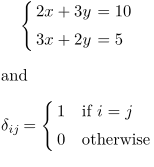
\startformula
 \startcases[align={right,left},distance=3pt]
   \NC 2x + 3y \NC = 10 \NR
   \NC 3x + 2y \NC = 5  \NR
 \stopcases
\stopformula

and

\startformula
\delta_{ij} =
 \startmathcases
 \NC 1 \NC \text{if } i = j \NR
 \NC 0 \NC \text{otherwise} \NR
 \stopmathcases
\stopformula
gives
-
The second column is by default in math mode. To typeset the second column in text mode, use \TC:
-
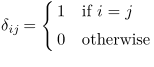
\startformula
\delta_{ij} =
 \startmathcases
 \NC 1 \TC if \m{i = j} \NR
 \NC 0 \TC otherwise    \NR
 \stopmathcases
\stopformula
gives
-
with \definemathmatrix
One of the powerful structures in displaying mathematical formulas is the possibility of defining custom maths alignment. For instance the following definition
-
\definemathmatrix
  [alignedcases]            % creates 2 new commands \startalignedcases \stopalignedcases
  [align={right,left,left},
   distance=3pt,
   left={\left\{},
   right={\right.},
   style=\displaystyle]

The following formula is displayed in two lines with an appropriate alignment of the equations:

\startformula
\startalignedcases
 \NC -\Delta u + g(u) \NC{} = f \NC \quad\mbox{in } \Omega\NR
 \NC {\partial u \over \partial {\bf n} } \NC{} = h(u) \NC \quad\mbox{on } \partial\Omega   \NR
\stopalignedcases
\stopformula
-

Numbering cases with \startplaceformula plus \startsubformulas
As you may expect:
-
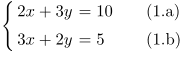
\startsubformulas
\startplaceformula
\startformula
 \startcases[align={right,left},distance=3pt]
   \NC 2x + 3y \NC = 10 \NR[eq:a]
   \NC 3x + 2y \NC = 5  \NR[eq:b]
 \stopcases
\stopformula
\stopplaceformula
\stopsubformulas
gives
-