Command/setupscale

Unofficial ConTeXt Wiki mirror

Last modified: 2026-02-07

Summary

The command \setupscale is used to define the general behaviour of \scale.

Settings

\setupscale[...,...][...=...,...]
[...,...] name
scale number
xscale number
yscale number
width dimension
height dimension
depth yes no
lines number
factor fit broad max min auto default
hfactor fit broad max min auto default
wfactor fit broad max min auto default
maxwidth dimension
maxheight dimension
s number
sx number
sy number
equalwidth dimension
equalheight dimension
grid yes fit height depth halfline

Option Explanation
scale
scaling, affected by "factor"
number this is expressed in permille units, so 1000 = natural size
xscale
number this is expressed in permille units, so 1000 = natural size
yscale
number this is expressed in permille units, so 1000 = natural size
lines
height in lines
factor
the factor settings take the enclosing environment into account, in some way
fit scale proportionally, fill the area defined with width and height as possible, don’t exceed it but leave space
broad like "fit", but result is downscaled by 4x bodyfontsize
max scale proportionally, fill the area defined with width and height as possible, can exceed it
min like default, meant for images with a similar aspect ratio as the surrounding box; can exceed the size defined with width and height, combine with \clip
auto like "fit"
default width and height are observed, content may get distorted
hfactor
height factor
wfactor
width factor
maxwidth
maximum width
maxheight
maximum height
s
scale as a simple multiplier, so 1 = natural size
sx
horizontal scale as a simple multiplier, so 1 = natural size
sy
vertical scale as a simple multiplier, so 1 = natural size

Description

Examples

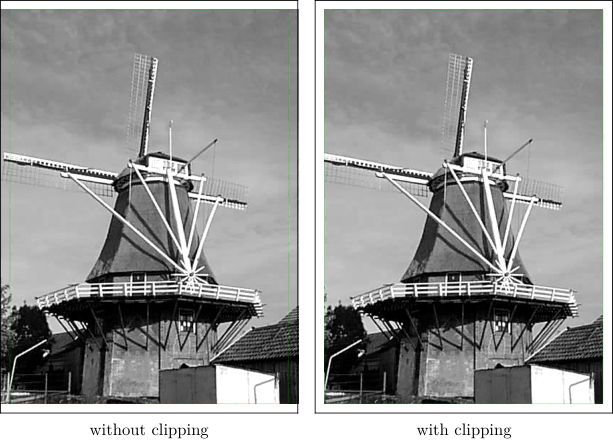
factor=min

With factor=min and clipping to the max size you achieve proportional filling the max area.

  • % Wolfgang Schuster 2026-02-07
    
    \startbuffer[Example]
    \setupexternalfigures[location=default]
    
    \setuppapersize[A4][A4,oversized]
    \setuplayout[location=middle]
    
    \showframe
    
    \starttext
    
    \startpagemakeup
    \centerbox{\scale[factor=min]{\externalfigure[mill]}}%
    \stoppagemakeup
    
    \startpagemakeup
    \clip[width=1pw,height=1ph]{\centerbox{\scale[factor=min]{\externalfigure[mill]}}}%
    \stoppagemakeup
    
    \stoptext
    \stopbuffer
    
    \startTEXpage
    \startcombination[2*1]
    {\typesetbuffer[Example][page=1,height=7cm,frame=on]}{without clipping}
    {\typesetbuffer[Example][page=2,height=7cm,frame=on]}{with clipping}
    \stopcombination
    \stopTEXpage
    

Notes

See also

Help from ConTeXt-Mailinglist/Forum

All issues with: