Contents
Summary
The command
\placeformula
places a displayed math formula
Settings
| \placeformula[...,...]{...} | |
| [...,...] | + - reference |
| {...} | text |
| Option | Explanation |
|---|---|
| text | either a braced argument, or a \startformula ... \stopformula block |
Description
Place a displayed math formula, including equation number.
The text argument is typically a \startformula ... \stopformula block instead of a literal braced argument.
Examples
Example 1
-
\placeformula[formula:aformula]
\startformula
y=x^2
\stopformula
\placeformula
\startformula
\int_0^1 x^2 dx
\stopformula
-

Numbering tricks
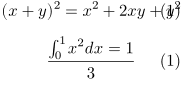
If you wish to begin the numbering anew you can add \resetnumber before \placeformula:
-
\placeformula[formula:aformula]
\startformula
(x+y)^2 = x^2 + 2xy + y^2
\stopformula
\resetnumber[formula]
\placeformula
\startformula
\int_0^1 x^2 dx = {1 \over 3 }
\stopformula
-
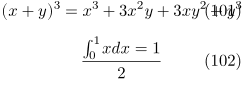
If you wish to start the numbering at a certain number, say at 100, you can add \setnumber before \placeformula:
-
\setnumber[formula][100]
\placeformula[formula:aformula]
\startformula
(x + y) ^3 = x^3 + 3x^2y + 3xy^2 + y^3
\stopformula
\placeformula
\startformula
\int_0^1 x dx = {1 \over 2}
\stopformula
-