This page has recently been revised and reorganized.
Further corrections, additions, and improvements are welcome. Please feel free to edit or modify this page to improve it.
TEI XML with ConTeXt
This page is a general introduction to processing TEI XML with ConTeXt.
It combines current guidance with a documented historical strand. In particular, it preserves and comments on a substantial 2010 contribution by Thomas A. Schmitz, classical philologist and long-time ConTeXt user, who used a TEI edition of Philostratus's Lives of the Sophists as a practical XML → ConTeXt test case.
For a structured modern treatment of textual witnesses, critical apparatuses, Lua validation, and scholarly-page composition, see Building critical editions from TEI XML with ConTeXt.
Contents
-
1
TEI XML with ConTeXt
- 1.1 1. What this page is for
- 1.2 2. Do not try to implement all of TEI
- 1.3 3. Three TEI → ConTeXt workflows
- 1.4 4. The basic ConTeXt-native workflow
- 1.5 5. A small current example
- 1.6 6. Structure and typography are different layers
- 1.7 7. \xmltext and \xmlflush
- 1.8 8. Multilingual TEI
- 1.9 9. Poetry: from TEI structure to page structure
- 1.10 10. Parallel text is an editorial model
- 1.11 11. Notes and structured layouts
- 1.12 12. When Lua becomes useful
- 1.13 13. Critical editions: where the six-guide series begins
-
1.14
14. Thomas A. Schmitz's Philostratus workflow (2010): source, reconstruction, and perspective
- 1.14.1 14.1. Why this contribution matters here
- 1.14.2 14.2. Thomas Schmitz: original introduction
- 1.14.3 14.3. Thomas Schmitz: Our XML file
- 1.14.4 14.4. Thomas Schmitz: The ConTeXt style file
- 1.14.5 14.5. Reading the 2010 source today
- 1.14.6 14.6. A current scholarly reconstruction of Thomas Schmitz's example
- 1.14.7 14.7. From the 2010 experiment to current TEI workflows
- 1.15 15. A cumulative map of the whole page
- 1.16 16. Practical checklist
- 1.17 17. Example sources and TEI resources
- 1.18 18. Further reading
- 1.19 19. See also
The Text Encoding Initiative (TEI) develops and maintains guidelines for representing texts in digital form.
TEI is widely used in scholarly editing because it can describe not only the words of a text but also its structure and many kinds of scholarly information: divisions, names, places, page references, verse lines, witnesses, textual variation, editorial responsibility, and much more.
ConTeXt can process XML directly and can therefore be used to turn selected TEI structures into a typeset document.
The central idea of this page is simple:
                 TEI XML
                    │
                    │ describes
                    ▼
        STRUCTURE + SEMANTICS
                    │
                    │ mapped explicitly
                    ▼
            ConTeXt XML setups
                    │
                    │ control
                    ▼
        TYPOGRAPHICAL FUNCTIONS
                    │
                    ▼
                  PAGE
Guiding principle.
TEI describes the scholarly structure of the document.
ConTeXt does not automatically decide how that structure should look. The project defines an explicit mapping from XML semantics to typographical behaviour.
Historical continuity.
This separation between encoded structure and typographical interpretation is not only a modern formulation. Thomas A. Schmitz's 2010 Philostratus example, preserved in section 14, develops the same project-specific logic step by step. The historical material is retained as source documentation; current LMTX examples and commentary are clearly distinguished from it.
1. What this page is for
This page answers the general question:
How can a TEI XML document
become a ConTeXt document?
It concentrates on four ideas:
- selecting the part of TEI that a project actually needs;
- loading and traversing XML with ConTeXt;
- mapping XML structures to ConTeXt functions;
- keeping scholarly structure distinct from typographical presentation.
The page also introduces two common extensions:
- multilingual and parallel texts;
- poetry with line-based commentary.
Critical editions involving witness registries, structured apparatus entries, complex textual variation, Lua validation, and several apparatus layers are treated separately in the six-guide series Building critical editions from TEI XML with ConTeXt.
1.1. The mental map
TEI source
    │
    ▼
load XML
    │
    ▼
select nodes
    │
    ▼
route elements
    │
    ▼
process / flush content
    │
    ▼
ConTeXt commands
    │
    ▼
typeset page
As a project becomes more complex:
TEI source
    │
    ▼
XML selection
    │
    ├──────────── direct mapping ────────────┐
    │                                        │
    └──────────── Lua processing ────────────┤
                                             │
                                             ▼
                                          ConTeXt
                                             │
                                             ▼
                                            PDF
2. Do not try to implement all of TEI
TEI is deliberately extensive. A project usually needs only a fraction of its vocabulary.
A useful project model is:
FULL TEI VOCABULARY
        │
        │ select what the edition needs
        ▼
PROJECT TEI PROFILE
        │
        │ map those structures
        ▼
ConTeXt STYLE / XML SETUPS
        │
        ▼
PROJECT OUTPUT
For one project:
TEI
├── teiHeader
├── text
│   └── body
│       ├── div
│       ├── head
│       ├── p
│       ├── note
│       └── pb
A verse edition may add:
TEI
├── ...
└── text
    └── body
        ├── lg
        └── l
A critical edition may add:
TEI
├── ...
├── listWit
└── text
    └── app
        ├── lem
        └── rdg
Do not confuse TEI support with a universal TEI renderer.
A ConTeXt project normally implements the subset and editorial conventions it actually uses.
The appropriate solution is therefore usually a project-specific mapping, not one monolithic style intended to assign typography to every possible TEI element.
Historical continuity.
Thomas A. Schmitz articulated essentially the same design principle in his 2010 Philostratus contribution preserved in section 14: do not attempt to assign typography to the whole TEI vocabulary. Select the structures required by the edition and define a project-specific ConTeXt mapping for them.
2.1. Workflows evolve
A project may begin with:
text
paragraphs
headings
and later add:
names
places
page references
notes
verse
translations
apparatus entries
The ConTeXt mapping can grow at the same time.
At this stage.
The first design decision is not typographical.
It is to identify which TEI structures the edition actually needs and to keep that profile stable enough that the mapping remains predictable.
3. Three TEI → ConTeXt workflows
There is no single mandatory processing architecture.
3.1. ConTeXt-native XML processing
TEI XML
   │
   ▼
ConTeXt XML interface
\xmlload / \xmlprocessfile / \xmlprocessbuffer
   │
   ▼
\xmlsetups + selection
   │
   ▼
ConTeXt typography
   │
   ▼
PDF
This is the clearest starting point for many projects.
It is especially useful when the task is mainly:
- selecting TEI structures;
- assigning typographical behaviour;
- handling multilingual text;
- composing verse or parallel passages;
- routing annotations into ConTeXt note systems.
A documented ConTeXt XML trajectory.
Thomas A. Schmitz was already an established ConTeXt contributor before the 2010 Philostratus page. His 2007 article Greek support for the ConTeXt macro package describes the implementation of polytonic Greek support in ConTeXt and identifies him with the Department of Classics at Bonn University. In 2011 he presented xml in ConTeXt mkiv — tutorial for beginners at the ConTeXt User Meeting, explicitly describing XML as an input format for ConTeXt and the separation of content from presentation.
This helps place the 2010 Philostratus material within a continuous sequence of work on scholarly languages, XML structure, and project-specific typesetting.
3.2. Lua-assisted processing inside ConTeXt
TEI XML
   │
   ▼
ConTeXt XML access
   │
   ▼
Lua processing
   │
   ├── collect
   ├── normalize
   ├── resolve
   ├── validate
   └── reorganize
   │
   ▼
semantic ConTeXt commands
   │
   ▼
PDF
This architecture is developed in detail for critical apparatus data in Processing TEI critical apparatus data with Lua.
3.3. Hybrid workflows
TEI XML
   │
   ▼
preprocessing / transformation
   │
   ▼
project-specific XML or records
   │
   ▼
ConTeXt
   │
   ▼
PDF
This may be useful for large corpora or workflows shared with other publication systems.
Choose the smallest useful architecture.
Use direct ConTeXt XML processing when an explicit XML-to-typography mapping is enough.
Introduce Lua or preprocessing when a real transformation, validation, or data-management problem requires it.
4. The basic ConTeXt-native workflow
The first useful model has four operations:
LOAD
  ↓
SELECT
  ↓
ROUTE
  ↓
FLUSH
4.1. Load XML
An external XML file can be processed with:
\xmlprocessfile
  {tei}
  {example.xml}
  {}
For a self-contained MWE:
\startbuffer[example]
...
\stopbuffer

\xmlprocessbuffer
  {tei}
  {example}
  {}
4.2. Select and route elements
XML element
     │
     ▼
\xmlsetsetup
     │
     ▼
named XML setup
     │
     ▼
ConTeXt action
For example:
tei:p
  │
  ▼
xml:tei:paragraph
  │
  ▼
paragraph typography
4.3. Flush selected content
XML NODE
   │
   ▼
setup receives node
   │
   ▼
\xmlflush{#1}
   │
   ▼
children continue through
the XML processing system
5. A small current example
The following example is intentionally modest. It contains:
- a title;
- a Latin paragraph;
- a person name;
- a place name;
- a note;
- a French translation.
5.1. TEI source
Save as cicero-sample-tei.xml:
<?xml version="1.0" encoding="UTF-8"?>

<TEI xmlns="http://www.tei-c.org/ns/1.0">
  <teiHeader>
    <fileDesc>
      <titleStmt>
        <title>A small TEI example</title>
      </titleStmt>
      <publicationStmt>
        <p>Unpublished teaching example.</p>
      </publicationStmt>
      <sourceDesc>
        <p>Demonstration only.</p>
      </sourceDesc>
    </fileDesc>
  </teiHeader>

  <text>
    <body>

      <div type="edition" xml:lang="la">
        <head>Exemplum Ciceronis</head>
        <p>
          <persName>Marcus Tullius Cicero</persName>
          in
          <placeName>Arpino</placeName>
          natus est.
          <note>Simple note.</note>
        </p>
      </div>

      <div type="translation" xml:lang="fr">
        <head>Traduction française</head>
        <p>Cicéron naquit à Arpinum.</p>
      </div>

    </body>
  </text>
</TEI>
5.2. What ConTeXt must map
TEI
├── teiHeader
│
└── text
    └── body
        ├── div [edition, la]
        │   ├── head
        │   └── p
        │       ├── persName
        │       ├── placeName
        │       └── note
        │
        └── div [translation, fr]
            ├── head
            └── p
We want:
head       ─────► heading
p          ─────► paragraph
persName   ─────► small capitals
placeName  ─────► emphasis
note       ─────► footnote
xml:lang   ─────► language selection
5.3. Self-contained MWE and rendered output
For the Garden, it is useful to make the example self-contained. The TEI
fragment is therefore embedded in a buffer. The <context>
block below is compiled by the wiki itself: the source is shown and the
resulting PDF page is converted into the rendered image displayed below it.
-
\setuppapersize[A6] \setupbodyfont[10pt] \startbuffer[cicero] ="1.0" encoding="UTF-8"?>
="http://www.tei-c.org/ns/1.0"> \stopbuffer \xmlregisterns {tei} {http://www.tei-c.org/ns/1.0} \startxmlsetups xml:tei:document \xmlsetsetup {#1} {tei:TEI|tei:text|tei:body} {xml:tei:flush} \xmlsetsetup {#1} {tei:teiHeader} {xml:tei:ignore} \xmlsetsetup {#1} {tei:div} {xml:tei:division} \xmlsetsetup {#1} {tei:head} {xml:tei:head} \xmlsetsetup {#1} {tei:p} {xml:tei:paragraph} \xmlsetsetup {#1} {tei:persName} {xml:tei:person} \xmlsetsetup {#1} {tei:placeName} {xml:tei:place} \xmlsetsetup {#1} {tei:note} {xml:tei:note} \stopxmlsetups \xmlregistersetup{xml:tei:document} \startxmlsetups xml:tei:flush \xmlflush{#1} \stopxmlsetups \startxmlsetups xml:tei:ignore \stopxmlsetups \startxmlsetups xml:tei:division \begingroup \doifelse {\xmlatt{#1}{xml:lang}} {fr} {\language[fr]} {\language[la]} \xmlflush{#1} \endgroup \stopxmlsetups \startxmlsetups xml:tei:head \blank[medium] {\bf \xmlflush{#1}}\par \stopxmlsetups \startxmlsetups xml:tei:paragraph \par \xmlflush{#1} \par \stopxmlsetups \startxmlsetups xml:tei:person \sc{\xmlflush{#1}} \stopxmlsetups \startxmlsetups xml:tei:place \emph{\xmlflush{#1}} \stopxmlsetups \startxmlsetups xml:tei:note \footnote{\xmlflush{#1}} \stopxmlsetups \starttext \xmlprocessbuffer{main}{cicero}{} \stoptextA small TEI example Unpublished teaching example.
Demonstration only.
="edition" xml:lang="la"> Exemplum CiceronisMarcus Tullius Cicero inArpino natus est.Simple note. ="translation" xml:lang="fr"> Traduction françaiseCicéron naquit à Arpinum.
-
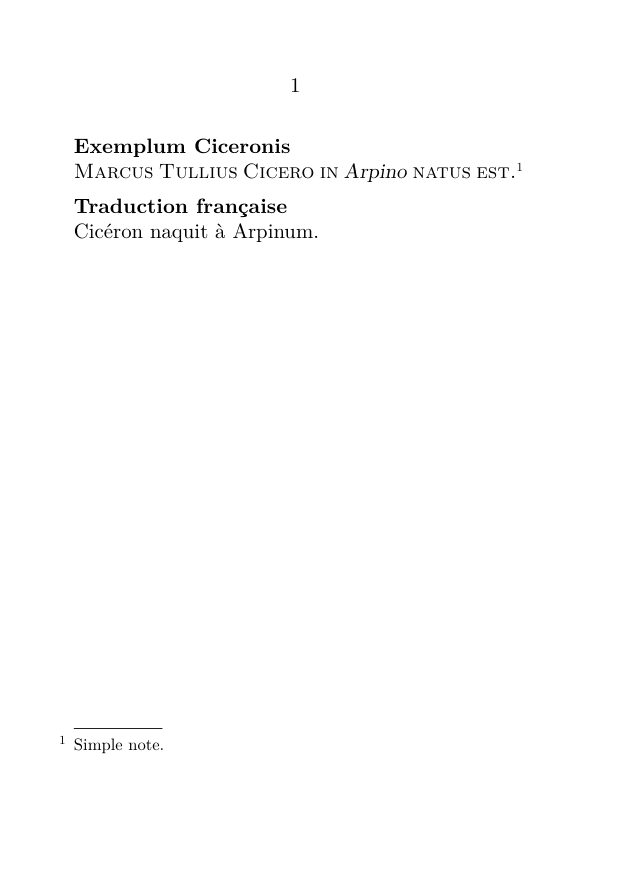
First milestone.
The XML supplies structure and semantics, while ConTeXt supplies the visual interpretation.
Nothing in the TEI source says that a person name must be small capitals or that a place name must be italic. Those are choices made by the typesetting layer.
6. Structure and typography are different layers
Consider:
<p>
  <persName>Marcus Tullius Cicero</persName>
  in
  <placeName>Arpino</placeName>
  natus est.
</p>
TEI says:
paragraph
├── person name
├── ordinary text
├── place name
└── ordinary text
ConTeXt may render:
person name  ─────► SMALL CAPITALS
place name   ─────► italics
paragraph    ─────► normal prose
Another edition could choose another rendering without changing the TEI.
Do not encode presentational accidents as semantic data.
The XML records the role. ConTeXt chooses its appearance.
7. \xmltext and \xmlflush
A particularly important practical distinction is the difference between extracting textual content and preserving the XML subtree.
7.1. Flat content
<l>First light touches the closed houses.</l>
For flat content, extracting the text may be sufficient:
\xmltext{#1}
7.2. Nested content
<l>
  First <emph>light</emph> touches the closed houses.
</l>
Conceptually:
\xmltext
   │
   ▼
text content
   │
   └── nested element structure is not processed

\xmlflush
   │
   ▼
XML subtree
   │
   └── nested setups can still act
With:
\startxmlsetups xml:tei:emph
  \emph{\xmlflush{#1}}
\stopxmlsetups
the nested element remains available to the XML processing system.
Practical rule.
Use textual extraction when you really want only flat text.
Use \xmlflush when nested markup must remain visible to
subsequent XML setups.
This matters for:
-
<emph>,<hi>,<foreign>; -
<persName>,<placeName>; - notes and references;
-
<app>,<lem>,<rdg>.
8. Multilingual TEI
TEI can attach language information with xml:lang:
<div type="original" xml:lang="grc">
  ...
</div>

<div type="translation" xml:lang="fr">
  ...
</div>
Mental model:
TEI node
   │
   ├── content
   └── xml:lang
          │
          ▼
    ConTeXt language setup
          │
          ▼
    appropriate typography
    and language behaviour
The important distinction is:
LANGUAGE
    ≠
SCRIPT
    ≠
FONT
    ≠
DIRECTION
For a broader treatment, see Input and compilation/Languages and Mixed languages.
Keep the layers distinct.
xml:lang="grc" identifies the language of a TEI node.
It does not by itself define which font, fallback, column, or note style ConTeXt should use.
A real multilingual scholarly example combining Ancient Greek, English, and French is developed in section 14.6 below, where Thomas Schmitz's Philostratus experiment is reconstructed with current LMTX.
9. Poetry: from TEI structure to page structure
Poetry makes the TEI → ConTeXt relationship especially visible.
TEI may encode:
lg
├── l
├── l
├── l
└── l
ConTeXt must decide:
How are the lines numbered?
How are stanzas separated?
How is a translation aligned?
Where does commentary appear?
What happens at page and column breaks?
9.1. A parallel poetic model
stanza
├── original
│   ├── line 1
│   └── line 2
│
├── translation
│   ├── line 1
│   └── line 2
│
└── commentary
    ├── note for line 1
    └── note for line 2
This may become:
+------+----------------------+----------------------+
| line | original             | translation          |
+------+----------------------+----------------------+
| 1    | original line 1      | translated line 1    |
| 2    | original line 2      | translated line 2    |
+------+----------------------+----------------------+

commentary notes
----------------
1. ...
2. ...
The transformation is:
TEI SEMANTICS
orig / trans / comm
        │
        ▼
EXPLICIT MAPPING
        │
        ▼
PAGE FUNCTIONS
column / column / notes
9.2. External XML versus an internal buffer
For production:
external TEI file
      │
      ▼
ConTeXt environment
      │
      ▼
PDF
For a teaching MWE:
ONE ConTeXt FILE
│
├── XML buffer
├── XML setups
├── note definitions
└── typesetting call
Technical note.
An internal buffer is primarily a convenient teaching and testing device.
For a substantial edition, external TEI files normally provide a cleaner separation between documentary data and the ConTeXt environment.
9.3. Compact poetry MWE and rendered output
The following preserves the buffer method developed in earlier versions
of this page. Because it is enclosed in a <context source="yes">
block, the Garden compiles the code and displays the image generated from
its PDF output automatically.
-
\setuppapersize[A5,landscape] \setupTABLE[frame=off] \setupTABLE[column][1][width=.08\textwidth] \setupTABLE[column][2][width=.44\textwidth] \setupTABLE[column][3][width=.44\textwidth] \definenote[commnote] \setupnote [commnote] [location=text, rule=off, paragraph=yes, inbetween=\quad, style=\tfxx] \startbuffer[poem]
="stanza"> ="orig"> First light touches the closed houses, and the street breathes a pale memory. ="trans"> La première lumière effleure les maisons closes, et la rue respire une mémoire pâle. ="comm"> light] atmospheric motif in the poem. memory] semantic key recurring in the poem. -
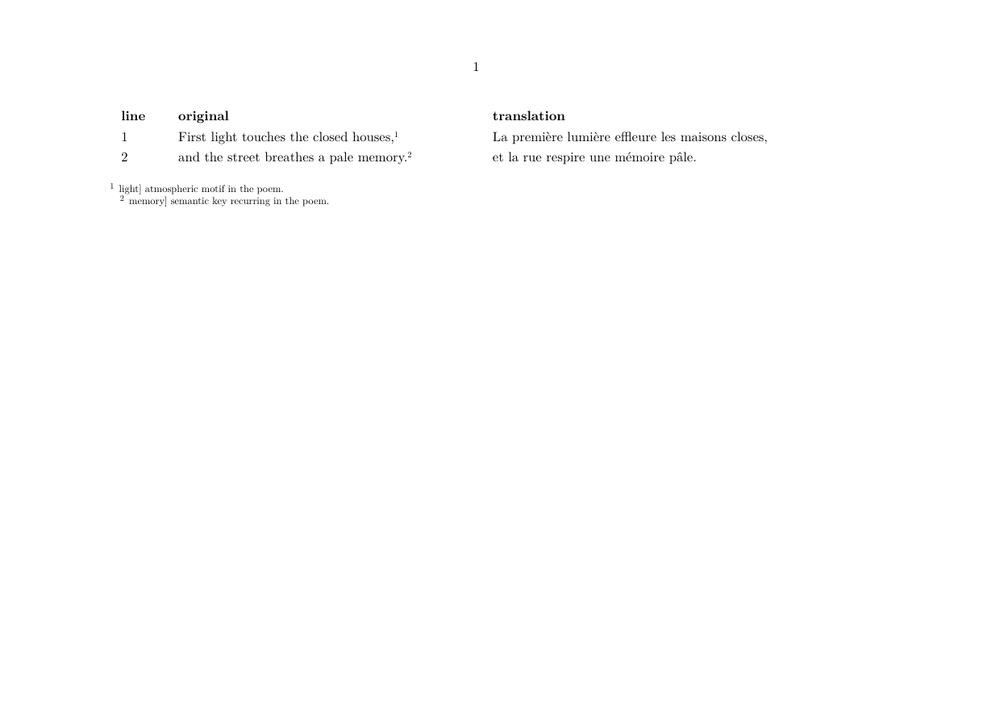
Mapping:
lg[type=stanza]
      │
      ▼
iterate over lines
      │
      ├── orig/l[i]  ─────► original column
      ├── trans/l[i] ─────► translation column
      └── comm/l[i]  ─────► collected note
Poetry milestone.
The XML describes three parallel semantic sequences.
ConTeXt turns them into a stable spatial relationship: numbered lines, parallel text, and commentary placed outside the table.
10. Parallel text is an editorial model
The poetry example aligns units by position:
original line 1    ↔    translation line 1
original line 2    ↔    translation line 2
But parallel text does not always mean word-for-word or line-for-line equivalence.
For prose:
source paragraph
       │
       │ textual correspondence
       ▼
translation paragraph

each side keeps
its own internal rhythm
The appropriate alignment unit may be:
- line;
- stanza;
- sentence;
- paragraph;
- numbered passage;
- another project-defined textual unit.
Alignment expresses an editorial relationship.
Do not impose mechanical alignment merely because a table or set of columns makes it technically possible.
The prose reconstruction in section 14.6 illustrates this point: the Greek source and its English and French translations remain structurally related, while each language keeps its own paragraph rhythm rather than being forced into line-by-line correspondence.
11. Notes and structured layouts
Notes become more delicate when they originate inside tables, parallel columns, verse rows, or other boxed material.
structured text
     │
     ├── note call
     │
     ▼
table / column
     │
     ▼
where should the note text go?
A controlled solution is:
note call inside structure
          │
          ▼
dedicated note series
          │
          ▼
collect notes
          │
          ▼
explicit placement
outside the structure
This is why the poetry example uses a dedicated note series and places its notes after the table.
See References notes and floats/Footnotes.
12. When Lua becomes useful
ConTeXt-native XML processing is often sufficient when XML structures can be mapped directly to typographical functions.
Lua becomes useful when the workflow needs:
TEI
 │
 ▼
collect many structures
 │
 ▼
normalize values
 │
 ▼
resolve identifiers
 │
 ▼
validate relationships
 │
 ▼
reorganize data
 │
 ▼
ConTeXt
Typical reasons include:
- validating witness references;
- collecting apparatus entries before typesetting;
- sorting or grouping data;
- generating indexes or derived structures;
- constructing reusable intermediate records;
- producing diagnostic reports.
A useful architecture is:
ConTeXt XML access
        │
        ▼
Lua transformation / validation
        │
        ▼
semantic ConTeXt interface
        │
        ▼
typography
Avoid unnecessary duplicate parsing layers.
ConTeXt already provides XML loading, selection, traversal, and setup mechanisms.
Add another processing layer because the scholarly workflow needs additional transformation or validation, not merely because the source happens to be XML.
13. Critical editions: where the six-guide series begins
The general workflow becomes more demanding when the TEI document contains a critical apparatus.
TEI document
    │
    ▼
witness declarations
    │
    ▼
apparatus entries
    │
    ▼
complex textual variation
    │
    ▼
processing + validation
    │
    ▼
scholarly-page composition
See Building critical editions from TEI XML with ConTeXt.
13.1. The six-guide progression
GUIDE 1
TEI document structure
        │
        ▼
GUIDE 2
witness identities
        │
        ▼
GUIDE 3
basic apparatus relations
        │
        ▼
GUIDE 4
complex textual variation
        │
        ▼
GUIDE 5
Lua normalization + resolution + validation
        │
        ▼
GUIDE 6
ConTeXt typographical composition
Division of labour.
This page introduces the general TEI → ConTeXt relationship.
The six-guide collection develops one specialised application of that relationship: constructing critical editions from structured TEI data.
14. Thomas A. Schmitz's Philostratus workflow (2010): source, reconstruction, and perspective
This section preserves a substantial early contribution to this page by Thomas A. Schmitz, dated 2010. Thomas Schmitz is a classical philologist and Professor of Classical Philology/Greek at the University of Bonn. His research includes the Second Sophistic and Philostratus, making Lives of the Sophists a natural scholarly test case rather than an arbitrary demonstration text.
Thomas Schmitz was also an active ConTeXt contributor. His 2007 paper Greek support for the ConTeXt macro package identifies him as Thomas A. Schmitz of the Department of Classics, Bonn University, and documents his work on polytonic Greek support in ConTeXt. The historical Garden document GreekInContext.pdf belongs to the same strand of work. At the 2011 ConTeXt User Meeting he later presented xml in ConTeXt mkiv — tutorial for beginners.
Against that background, the 2010 Philostratus material is especially valuable: it connects an actual philological editing problem with the XML-processing facilities of ConTeXt at that time. Rather than replacing Thomas Schmitz's explanation with a modern summary, the subsections below retain as much as possible of his original wording, progression, XML, and ConTeXt code. Editorial comments added during the present revision are clearly separated from the historical source.
For the modern development of these ideas in critical-edition workflows, see Building critical editions from TEI XML with ConTeXt.
Historical source and editorial policy.
The source text below is the contribution preserved in the earlier Garden page and signed:
[[User:Thomas|Thomas]] 21:38, 7 November 2010 (UTC)
The identification of this contributor as Thomas A. Schmitz is consistent with his documented ConTeXt work, his Bonn affiliation, and his scholarly work on Philostratus and the Second Sophistic.
His wording and pedagogical progression are retained wherever possible. The two original section headings have only been demoted so that they fit inside the present page structure. Version-specific statements, old links, and historical ConTeXt syntax are preserved as part of the source and should not automatically be treated as current LMTX guidance.
The preserved source contains a version warning referring to December 2010 even though the visible signature is dated 7 November 2010. This page does not attempt to reconstruct the intervening wiki revision history; it preserves the source as it has come down to us.
14.1. Why this contribution matters here
Thomas Schmitz's example was not conceived as a universal TEI renderer. It arose from a real scholarly-editing problem: a classicist working on Philostratus needed to connect the TEI structures required by his edition to ConTeXt's XML interface. That combination of scholarly purpose and technical experimentation is precisely what makes the example worth preserving.
The historical situation can be summarized as follows:
2010

Philostratus TEI source
        │
        ▼
project-specific XML selection
        │
        ▼
ConTeXt XML setups
        │
        ▼
scholarly typography
The same general separation still structures the current page:
encoded scholarly structure
          │
          ▼
explicit project interpretation
          │
          ▼
typographical realisation
14.2. Thomas Schmitz: original introduction
The following paragraphs preserve Thomas Schmitz's original introduction as closely as possible.
TEI (Text Encoding Initiative) is "a consortium which collectively develops and maintains a standard for the representation of texts in digital form," to quote their own website. They have developed a series of guidelines for editing texts in a digital form. In their latest form (which is called P 5), these guidelines weigh in at a hefty 1350 pages (OK, that's counting the bibliography and the index too; there are only 1290 pages of real text). These describe an xml format which is suitable for editing texts. The TEI guidelines have the advantage of being very well documented. There are a number of free resources available that should help everyone who is interested in getting started (one extremely helpful website with lots of tutorials, examples, and tests is TEI by example). They are not (and do not aspire to be) an absolute standard that everyone has to follow, but many academic projects use these guidelines, and they should be a pretty good way to make sure that your electronic edition of a text will be useful in the future.
Since editing texts is something which quite a few users of ConTeXt are involved in, it makes sense to think about ways in which xml documents which follow the TEI guidelines can be typeset with ConTeXt. We would invite users to keep a few caveats in mind:
- The TEI guidelines are very detailed because they try to cater to a large number of needs. Most users will only need a small subset of the tags and attributes which the guidelines offer (in fact, TEI is aware of this and has a slimmed down version of their guidelines which is called TEI Lite . This is a very good starting place to familiarize yourself with TEI). It would not make sense to try and provide a monolithic solution that defines all TEI tags; instead, localized ConTeXt style sheets are necessary which will define a subset which is relevant for a number of texts with similar features.
- Even with this huge number of tags, TEI does not expect to be sufficient for every text. Users are encouraged to develop their own styles; again, this necessitates special ConTeXt style sheets to process such adaptations.
- Encoding and typesetting texts in xml is an ongoing process. As you go forward in your edition, you realize that you need more tags, that you need to distinguish more special cases, that you want to add more information to your edition. This means that you will have to go back and forth between your xml file and the ConTeXt style and adapt both to your needs.
All of which means that the following paragraphs are just the first step in an ongoing attempt. I (Thomas) have written down a setup for a text that I am editing (for those who are interested: the Lives of the Sophists by Philostratus). I fully expect this to be a community effort: as others use TEI xml, they will discover new ways of handling things, will want to add features or add examples for other sorts of texts. My example is meant to start the discussion. Since those who edit texts usually have a background in the humanities, not in programming, I have added lengthy comments which will explain every step.
14.3. Thomas Schmitz: Our XML file
The following is Thomas Schmitz's original XML example and explanation, with the heading demoted to fit the present page.
Philostratus's text is in ancient Greek, but since the text itself doesn't matter much when we talk about structure and typesetting xml, I have replaced it here with a simple lorem ipsum text that is easier to display. So here's what the first paragraphs of the xml file philostratus.xml look like:
<?xml version="1.0"?>

<TEI xmlns="http://www.tei-c.org/ns/1.0" xml:lang="en">
  <teiHeader>
    <fileDesc>
      <titleStmt>
	<title>Lives of the Sophists</title>
	<author>Philostratus</author>
	<respStmt>
	  <resp>editor</resp>
	  <name xml:id="TAS">Thomas</name>
	</respStmt>
      </titleStmt>
      <publicationStmt>
	<p>Work in progress</p>
      </publicationStmt>
      <sourceDesc>
	<p>See indication of manuscripts</p>
      </sourceDesc>
    </fileDesc>
  </teiHeader>
  <text>
    <front>
      <div type="sigla">
	<listWit>
	  <witness id="c2">codd. 2</witness>
	  <witness id="Richards">Richards</witness>
	</listWit>
      </div>
      <div type="work">
	<head type="main">Philostrati</head>
	<head type="sub">Vitae Sophistarum.</head>
	<opener>
	  <salute>Lorem <pb ed="Olearius" n="479"/>Ipsum</salute>
	</opener>
      </div>
    </front>
    <body>
      <div xml:id="VS1" n="I" type="book">
	<div xml:id="VS1.1" n="1" type="chapter">
	  <div xml:id="VS1.1.1" n="1" type="section">
	    <p>Lorem ipsum dolor sit amet, consetetur sadipscing elitr, sed
	    diam nonumy eirmod tempor invidunt
	    <app>
	      <rdg wit="#Richards">induunt</rdg>
	    </app>
	    ut labore et dolore magna aliquyam erat, sed diam voluptua. At
	    vero eos et accusam et justo duo dolores et ea rebum. Stet
	    clita kasd gubergren
	    <app>
	      <rdg wit="#c2">arrgl</rdg>
	    </app>
	    <pb ed="Olearius" n="480"/>
	    no sea takimata sanctus est Lorem ipsum dolor sit amet. Lorem
	    ipsum dolor sit amet, consetetur sadipscing elitr, sed diam
	    nonumy eirmod tempor invidunt.</p>
	  </div>
	  <div xml:id="VS1.1.2" n="2" rend="inline" type="section">
	    <p>ut labore et dolore magna aliquyam erat, sed diam
	    voluptua. <pb ed="Olearius" n="481"/> At vero eos et accusam et
	    justo duo dolores et ea rebum. Stet clita kasd gubergren, no
	    sea takimata sanctus est Lorem ipsum dolor sit amet.
	    <lg>
	      <l>At vero eos et accusam et justo duo dolores</l>
	    </lg>
	    et
	    <lg>
	      <l>ea rebum. Stet clita kasd gubergren, no sea takimata</l>
	    </lg>
	    sanctus est Lorem ipsum dolor sit amet. Lorem ipsum dolor sit
	    amet</p>
	  </div>
	  <div xml:id="VS1.1.3" n="3" rend="paragraph" type="section">
	    <p>Duis autem vel eum iriure dolor in hendrerit in vulputate
	    velit esse molestie consequat, vel illum dolore eu feugiat
	    nulla facilisis at vero eros et accumsan et iusto odio
	    dignissim qui blandit praesent luptatum zzril delenit augue
	    duis dolore te feugait nulla facilisi. Lorem ipsum dolor sit
	    amet, consectetuer adipiscing elit, sed diam nonummy nibh
	    euismod tincidunt ut laoreet dolore magna aliquam erat
	    volutpat.</p>
	  </div>
	</div>
      </div>
    </body>
  </text>
</TEI>
So let's have a look at this file. This can be brief since most of the tags are described in the TEI guidelines and tutorials.
Every TEI file has as its root level (i.e. the "outer" level of the xml file) the element
<TEI>

</TEI>
which defines it as a TEI xml file. Everything else is a "child" of this root level. At the next level, you see two of these children: on the one hand, the <teiHeader> element. This contains meta-information about your electronic edition: title, author, editor, publication status, source of your edition. There can be much more information here. This is meta-information which will usually not be typeset in your edition.
The other child is the <text> element. This is what will really be in a typeset, printed edition. As you see, the <text> element has again two children. The <front> contains the title of the work you edit in the form in which it will appear in your typeset document, prefatory material, etc. The <body> element contains the text itself. This text has a logical structure: It consists of books, chapters, and sections. All of these logical parts are expressed via different <div> elements; to distinguish them from each other, these <div> elements have so-called attributes, so we have:
      <div xml:id="VS1" n="I" type="book">
	<div xml:id="VS1.1" n="1" type="chapter">
	  <div xml:id="VS1.1.1" n="1" type="section">
          </div>
        </div>
     </div>
As you can see, most of these "div" elements have other attributes as well: the "xml:id" attribute gives every section in your document a unique identifier. This makes it easier to refer to these sections later. You are free to choose these attributes; as an example, I have opted for a short numeric tag that refers to the paragraph. The "n" attribute is the name of the section as it will appear in your typeset edition. For classical prose texts, it is customary to have the chapter and section numbers appear in the margin of the edition, with no prefix and no additional information about the structure. E.g., at the beginning of chapter 8, there will be a bold 8 in the margin (the mark for "section 1" is understood and usually not expressed). For subsequent sections of chapter 8, there will be smaller section numbers in the margin, like "2," "3," etc. Finally, such sections of chapters do not necessarily begin a new paragraph. In order to make this clear, I have used the "rend" attribute (not exactly in the way TEI defines it, but close enough). For sections, I have two types of "rend" attributes: "inline" means that this section should just continue the typographical paragraph; "paragraph" means that it should begin in a new paragraph. This is an important distinction which I want to emphasize: in your typeset edition, these two will appear very different. For the logical structure of your digital text, however, they are both on the same level. That's why they are both "div" of the same type, but with different "rend" attributes.
Further, we have <pb> elements. These are used to denote pagebreaks in standard editions, which are often used for reference purposes and displayed in the margin; in the case of the Lives of the Sophists, this is the 18th-century edition of Olearius. These elements are inserted at the places where these pagebreaks occur.
Finally, we have the critical apparatus. Its notes are included in <app> elements. Every single entry into the apparatus is within a <rdg> (= reading) element.
This should be enough to get us started. We will now look at the way in which we will typeset such a xml document with ConTeXt.
14.4. Thomas Schmitz: The ConTeXt style file
The following preserves Thomas Schmitz's progressive construction of the ConTeXt style. Notice that he deliberately builds the mapping step by step rather than presenting a single final style file.
NB: Some of the functionality described here has been introduced quite recently. You will need a ConTeXt version not earlier than December 2010 in order to try this example!
In order to typeset such a file with ConTeXt, we need a style file which will map xml elements and attributes to specific ConTeXt commands. We have to save this file (let's call it tei-style.tex) somewhere where ConTeXt can find it (e.g., somewhere in your personal texmf tree or in the same directory as the xml file) and then typeset with the command context --environment=tei-style philostratus.xml. We will look at this file in detail:
\startxmlsetups xml:teisetups
        \xmlsetsetup{#1}{*}{-}
\stopxmlsetups
We define a set of \xmlsetups in a \start \stop environment, and we give it a name in the namespace xml:. The first line of these setups does only one thing: the \xmlsetsetup operates on the current xml tree (that's what the first argument {#1} refers to), takes all its elements ({*}) and discards them ({-}). That means only elements which we address explicitly will be typeset. This is necessary in our case because we do not want the information in the TEI header to be typeset.
For those elements we do want typeset, we have to add instructions. This involves a three-step process:
-
We have to add their names to a line which defines a
\xmlsetsetup - We define a specific setup for them
- (optional) we define TeX commands for typesetting
Let us begin with some easy steps. The xml tree we are operating on is empty now. So we first have to tell ConTeXt to pass the content of the topmost elements to its typesetting engine. The topmost element is TEI, so we write:
\startxmlsetups xml:teisetups
        \xmlsetsetup{#1}{*}{-}
        \xmlsetsetup{#1}{TEI}{xml:*}
\stopxmlsetups

\xmlregistersetup{xml:teisetups}

\startxmlsetups xml:TEI
	\xmlflush{#1}
\stopxmlsetups
So: we add the TEI element to a new \xmlsetsetup. We "register" the setups we have defined. And then we declare that the content of the element TEI should be passed to ConTeXt; this is what the line \xmlflush{#1} does.
Of course, we will do the same for the text element, but not for the TEIheader element, which we do not want to be typeset. So we now have:
\startxmlsetups xml:teisetups
        \xmlsetsetup{#1}{*}{-}
        \xmlsetsetup{#1}{TEI|text}{xml:*}
\stopxmlsetups

\xmlregistersetup{xml:teisetups}

\startxmlsetups xml:TEI
	\xmlflush{#1}
\stopxmlsetups

\startxmlsetups xml:text
	\xmlflush{#1}
\stopxmlsetups
Things become a bit more interesting when we look at the next level. We will start with the text proper, which is contained in the body element. For the text, we want line numbers in the margin, and we want these linenumbers in steps of five, in a small font. Here you can see the three steps we have to take:
\startxmlsetups xml:teisetups
        \xmlsetsetup{#1}{*}{-}
        \xmlsetsetup{#1}{TEI|text|body}{xml:*}
\stopxmlsetups

\xmlregistersetup{xml:teisetups}

\startxmlsetups xml:TEI
	\xmlflush{#1}
\stopxmlsetups

\startxmlsetups xml:text
	\xmlflush{#1}
\stopxmlsetups

\startxmlsetups xml:body
    \startlinenumbering
    \xmlflush{#1}
    \stoplinenumbering
\stopxmlsetups

\setuplinenumbering[location=inner,
                    step=5,
                    method=page,
                    style=\tfxx,
                    align=left,
                    distance=0.3em,
                    width=0.3cm]
So we have:
-
added the element
body
to our
\xmlsetsetup -
added a specific setup for the element which puts its content within a
\startlinenumberingenvironment -
added ConTeXt setup commands for the
\startlinenumberingenvironment.
Things become even more interesting at the next level. When you look at our xml document, you will see that the entire body consists of different divisions in div elements; the different levels are distinguished by different type attributes. This means we cannot simply add the div element to our general \xmlsetsetup, but have to add a specific \xmlsetsetup for every type. Fortunately, ConTeXt makes it easy to address these different elements. We begin with the book level: (for clarity, I will now only show the new steps, not the entire style document):
\startxmlsetups xml:teisetups
        \xmlsetsetup{#1}{*}{-}
        \xmlsetsetup{#1}{TEI|text|body}{xml:*}
	\xmlsetsetup{#1}{div[@type='book']}{xml:div:book}
\stopxmlsetups

\startxmlsetups xml:div:book
	\blank[line]\midaligned{\xmlatt{#1}{n}}\blank[medium]
	\xmlflush{#1}
\stopxmlsetups
What happens here? The expression div[@type='book'] means "every element div which has an attribute 'type' with the value 'book.'" We want a blank line before the title of the book. Then, we take the value of the n attribute (that's what the construct \xmlatt{#1}{n} expands to: the value of the attribute n of the current tag) and typeset it midaligned. We add another, smaller blank. And don't forget to "flush" the content of the div element!
For the next level, the chapter, we need again three steps: add it to the \xmlsetsetup, define a setup command and a ConTeXt macro for it:
\startxmlsetups xml:teisetups
        \xmlsetsetup{#1}{*}{-}
        \xmlsetsetup{#1}{TEI|text|body}{xml:*}
	\xmlsetsetup{#1}{div[@type='chapter']}{xml:div:chapter}
\stopxmlsetups

\startxmlsetups xml:div:chapter
	\PhilSection{\xmlatt{#1}{n}}
	\xmlflush{#1}
	\par
\stopxmlsetups

\defineinmargin [PhilSection] [outer] [normal] [distance=0.3em,style=\tfa\bf]
So: here, the argument of the n attribute is passed to a ConTeXt
macro \PhilSection. This macro is defined as an
\inmargin which will be typeset in the outer margin, in a
bigger, bold font. This will be the "chapter" numbering in the outer
margin.
For the section numbering, we take a similar approach, but as you will see, we need to define even more different setups:
\startxmlsetups xml:teisetups
        \xmlsetsetup{#1}{*}{-}
        \xmlsetsetup{#1}{TEI|text|body}{xml:*}
	\xmlsetsetup{#1}{div[@type='section']}{xml:div:section}
\stopxmlsetups

\startxmlsetups xml:div:section
	\doifelse
	 {\xmlatt{#1}{n}}
	 {1}
	 {\xmlflush{#1}}
	 {\doifelse
	  {\xmlatt{#1}{rend}}
	  {paragraph}
	  {\par\PhilSubsection{\xmlatt{#1}{n}}\xmlflush{#1}}
	  {\PhilSubsection{\xmlatt{#1}{n}}\xmlflush{#1}}}
\stopxmlsetups

\defineinmargin [PhilSubsection] [outer] [normal] [distance=0.3em,style=normal]
Here, we define a setup for the section level which contains two further
tests, for which we use ConTeXt's \doifelse macro. The first
\doifelse tests if the value of the n attribute is
"1," i.e., if this is the first section in a chapter. If it is, it does
nothing more than "flush" the content of this section -- remember, the
number for the first section should not appear in the margin since it is
implied in the chapter number. It's still good to have this number -- if
you ever decide that your typeset output should look different, the
information is there and can be shown. But for the time being, we do not
want it to appear, and that's what the first condition does. If the
n attribute's value isn't 1, another test is performed; this
time, we look at the value of the rend attribute. If this
attribute has the value "paragraph," we insert a \par, pass
the value of the n attribute to the macro
\PhilSubsection, and "flush" the content of our section. If
the value is anything else (i.e., "inline"), we flush the content without
inserting a \par. Then, we define \PhilSubsection
as another \inmargin, which will appear in the outer margin,
at the same place as the chapter numbering, but in a normal font. Finally,
when you look at the main text, you will see that we now have defined
setups for books, chapters, sections, but not yet for the smallest element,
p. Remember: we don't want paragraph breaks for these elements, so
all we need to do is "flush" them. Which means: we add the p
element to the list:
\xmlsetsetup{#1}{TEI|text|body|p}{xml:*}
and the appropriate setup is:
\startxmlsetups xml:p
	\xmlflush{#1}
\stopxmlsetups
And that's it! This is our structure for the main text! If you typeset the xml file with this setup, you get text with marginal numbering for your chapters and sections.
We now add the bells and whistles. We begin with the Olearius pagebreaks, the <pb> elements. If you've followed so far, this should be easy. As you see, these elements contain a reference to the relevant edition (the ed= attribute) and the pagenumber. If we had more elements of this type, it would make sense to define a setsetup for every one of them. In the case of Philostratus, we will probably only have Olearius, so we just add them to our list:
\xmlsetsetup{#1}{TEI|text|body|p|pb}{xml:*}
and add both the setup for the xml element and a new definition for a
marginal text (since we're a bit paranoid, we still test whether the
xmlattribute ed is set to Olearius). Since I want the
Olearius numbers in square brackets, I needed to take a two-step approach
(the square brackets would be confusing to the ConTeXt parser). So I first
define an inmargin \Zolearius and then a macro
\Olearius which takes this value and typesets it within square
brackets, in the outer margin, at a distance of 2em from the main text:
\startxmlsetups xml:pb
	\doifelse
	{\xmlatt{#1}{ed}}
	{Olearius}
	{\Olearius{\xmlatt{#1}{n}}}
	{}
\stopxmlsetups

\defineinmargin [ZOlearius] [outer] [normal] [distance=2em,style=small]

\define[1]\Olearius%
  {\ZOlearius{[#1]}}
Thomas 21:38, 7 November 2010 (UTC)
14.5. Reading the 2010 source today
Thomas Schmitz's contribution is especially useful because it makes several architectural choices explicit and because those choices arise from a real philological edition rather than from an abstract XML demonstration.
What remains important.
Thomas Schmitz already separates three levels:
TEI DATA
   │
   ▼
PROJECT-SPECIFIC INTERPRETATION
   │
   ▼
CONTEXT TYPOGRAPHY
He also assumes that an edition should process the TEI structures it actually needs rather than attempt to assign typography to the whole TEI vocabulary.
Four points deserve particular attention.
- Selective processing. Thomas Schmitz begins by discarding XML elements by default and then explicitly enabling the structures required by the edition.
-
Logical structure versus appearance.
The same
div type="section"can remain at one logical level whilerend="inline"andrend="paragraph"lead to different typographical behaviour. -
Stable scholarly references.
<pb ed="Olearius" n="480"/>preserves the pagination of an earlier edition independently of the pagination of the new one. - Incremental development. Thomas Schmitz explicitly expects both the TEI encoding and the ConTeXt mapping to evolve as the edition becomes richer.
The source also reveals the limits of the example at that date. The XML
already contains witness declarations, <app>/<rdg>
apparatus material, and <lg>/<l> verse structures,
but the signed style developed on the page does not yet carry all of those
structures through to a finished critical apparatus or verse layout.
Historical code is not current syntax by definition.
The commands and assumptions above belong to the ConTeXt environment of 2010. Some remain familiar; others may require adaptation under current LMTX. The historical text should therefore be read as a source document, not copied mechanically into a modern project.
14.6. A current scholarly reconstruction of Thomas Schmitz's example
Thomas Schmitz deliberately replaced the Ancient Greek of Philostratus with lorem ipsum because his immediate purpose was to explain XML structure and its typographical mapping rather than to reproduce the text of the edition. The historical example in section 14.3 is therefore preserved unchanged.
For the present reconstruction, the experiment can be taken one step further.
The placeholder text is replaced by a short authentic passage from
Philostratus's Lives of the Sophists, while the inherited Olearius page
references that motivated Thomas Schmitz's <pb> elements remain
part of the TEI data and are displayed in the margin.
English and French translations are added as explicitly identified language-bearing TEI structures. Bibliographical information is likewise encoded structurally rather than inserted as preformatted ConTeXt text. These additions are not part of Thomas Schmitz's 2010 source: they form a present-day extension intended to show how the same project-specific TEI → ConTeXt architecture can support a compact scholarly page.
The example is self-contained. The TEI source is held in a buffer so that the Garden can compile it directly and display both the source and the rendered page.
-
\setuppapersize[A5,landscape] \setuppagenumbering[state=stop] % Libertinus contains polytonic Greek and is distributed with ConTeXt. \setupbodyfont[libertinus,9pt] \setuplayout [backspace=12mm, width=middle, topspace=6mm, height=136mm, rightmargin=14mm, rightmargindistance=2mm] \setupwhitespace[none] \setupindenting[no] % ----------------------------------------------------------------- % Translation table % ----------------------------------------------------------------- \setupTABLE [frame=off, offset=0pt] \setupTABLE[column][1] [width=.48\textwidth, rightframe=on, offset=1.2mm] \setupTABLE[column][2] [width=.48\textwidth, offset=1.2mm] \setupTABLE[row][each] [align={normal,high}] % ----------------------------------------------------------------- % Line numbers and inherited Olearius pagination % ----------------------------------------------------------------- \setuplinenumbering [location=inner, step=5, method=page, style=\tfxx, align=left, distance=0.3em, width=0.3cm] \defineinmargin [ZOlearius] [outer] [normal] [distance=1em, style=\tfxx] \define[1]\Olearius {\ZOlearius{[#1]}} % ----------------------------------------------------------------- % TEI data % ----------------------------------------------------------------- \startbuffer[philostratus]
="http://www.tei-c.org/ns/1.0"> \stopbuffer % ----------------------------------------------------------------- % TEI namespace and routing % ----------------------------------------------------------------- \xmlregisterns {tei} {http://www.tei-c.org/ns/1.0} \startxmlsetups xml:philostratus % Ignore everything by default. \xmlsetsetup {#1} {*} {-} % Pass the document containers through. \xmlsetsetup {#1} {tei:TEI|tei:text|tei:body} {xml:flush} % The work node controls the page composition. \xmlsetsetup {#1} {tei:div[@type='work']} {xml:work} % Structures which can occur inside the selected blocks. \xmlsetsetup {#1} {tei:p} {xml:paragraph} \xmlsetsetup {#1} {tei:pb} {xml:pb} \xmlsetsetup {#1} {tei:quote} {xml:quote} % Structured bibliographical data. \xmlsetsetup {#1} {tei:author|tei:editor|tei:bibl|tei:biblScope|tei:pubPlace|tei:publisher|tei:date|tei:ref} {xml:bib:plain} \xmlsetsetup {#1} {tei:title} {xml:bib:title} \stopxmlsetups \xmlregistersetup{xml:philostratus} % ----------------------------------------------------------------- % Generic XML setups % ----------------------------------------------------------------- \startxmlsetups xml:flush \xmlflush{#1} \stopxmlsetups \startxmlsetups xml:paragraph \par \xmlflush{#1} \par \blank[2pt] \stopxmlsetups \startxmlsetups xml:pb \doifelse {\xmlatt{#1}{ed}} {Olearius} {\Olearius{\xmlatt{#1}{n}}} {} \stopxmlsetups \startxmlsetups xml:quote {\em \xmlflush{#1}} \stopxmlsetups % Bibliographical inline structures. % Titles marked level="m" are monograph/work titles and are italicized. \startxmlsetups xml:bib:plain \xmlflush{#1} \stopxmlsetups \startxmlsetups xml:bib:title \doifelse {\xmlatt{#1}{level}} {m} {\emph{\xmlflush{#1}}} {\xmlflush{#1}} \stopxmlsetups % ----------------------------------------------------------------- % Original and translations % ----------------------------------------------------------------- \startxmlsetups xml:original {\tfa\bf Philostratus — Greek text}\par \blank[small] \startlinenumbering \xmlflush{#1} \stoplinenumbering \stopxmlsetups \startxmlsetups xml:translation % The translations are secondary to the Greek source text. % A slightly smaller body size keeps the scholarly plate on % one A5 landscape page while preserving comfortable reading. \begingroup \switchtobodyfont[8pt] \doifelse {\xmlatt{#1}{n}} {en} { {\bf English translation}\par \language[en] \xmlflush{#1} } { {\bf Traduction française}\par \language[fr] \xmlflush{#1} } \endgroup \stopxmlsetups \startxmlsetups xml:bibliographic \hairline \blank[2pt] \start \tfxx \bf Text and references.\quad \rm \xmlflush{#1} \stop \stopxmlsetups % ----------------------------------------------------------------- % Page composition driven by the semantic TEI children % ----------------------------------------------------------------- \startxmlsetups xml:work \midaligned{\tfa\bf Philostratus, Lives of the Sophists I} \blank[small] % Full-width source text. Do not box this material: % the Olearius references are margin data and must remain % anchored to the lines where the="work">="original" xml:lang="grc">="Olearius" n="480"/> Τὴν ἀρχαίαν σοφιστικὴν ῥητορικὴν ἡγεῖσθαι χρὴ φιλοσοφοῦσαν· διαλέγεται μὲν γὰρ ὑπὲρ ὧν οἱ φιλοσοφοῦντες, ἃ δὲ ἐκεῖνοι τὰς ἐρωτήσεις ὑποκαθήμενοι καὶ τὰ σμικρὰ τῶν ζητουμένων προβιβάζοντες οὔπω φασὶ γιγνώσκειν, ταῦτα ὁ παλαιὸς σοφιστὴς ὡς εἰδὼς λέγει. προοίμια γοῦν ποιεῖται τῶν λόγων τὸ «οἶδα» καὶ τὸ «γιγνώσκω» καὶ «πάλαι διέσκεμμαι» καὶ «βέβαιον ἀνθρώπῳ οὐδέν». ἡ δὲ τοιαύτη ἰδέα τῶν προοιμίων εὐγένειάν τε προηχεῖ τῶν λόγων καὶ φρόνημα καὶ κατάληψιν σαφῆ τοῦ ὄντος.
="Olearius" n="481"/> ἥρμοσται δὲ ἡ μὲν τῇ ἀνθρωπίνῃ μαντικῇ, ἣν Αἰγύπτιοί τε καὶ Χαλδαῖοι καὶ πρὸ τούτων Ἰνδοὶ ξυνέθεσαν, μυρίοις ἀστέρων στοχαζόμενοι τοῦ ὄντος, ἡ δὲ τῇ θεσπιῳδῷ τε καὶ χρηστηριώδει· καὶ γὰρ δὴ καὶ τοῦ Πυθίου ἐστὶν ἀκούειν «οἶδα δ’ ἐγὼ ψάμμου τ’ ἀριθμὸν καὶ μέτρα θαλάσσης»
.="translation" n="en" xml:lang="en">The ancient sophistic art should be regarded as a rhetoric that philosophizes. It discusses the same subjects as philosophers do; but whereas philosophers, by setting up questions and advancing little by little through what is being investigated, say that they do not yet know, the sophist of the old school speaks as one who knows.
Accordingly, he begins his speeches with such expressions as “I know”, “I understand”, “I have considered the matter for a long time”, and “Nothing is certain for a human being”. This kind of opening gives the speech from the outset nobility and confidence, together with a clear grasp of what is real.
The former manner is akin to human divination, which the Egyptians and Chaldaeans, and before them the Indians, devised by inferring reality from countless stars; the latter is akin to inspired and oracular speech. Thus one may hear the Pythian god say: “I know the number of the grains of sand and the measure of the sea.”
="translation" n="fr" xml:lang="fr">Il faut considérer l’ancienne sophistique comme une rhétorique qui philosophe. Elle traite en effet des mêmes sujets que les philosophes ; mais tandis que ceux-ci, en posant des questions et en progressant peu à peu dans l’examen de ce qui fait l’objet de la recherche, déclarent ne pas encore savoir, l’ancien sophiste parle en homme qui sait.
Aussi commence-t-il ses discours par des formules telles que « je sais », « je connais », « j’y ai réfléchi depuis longtemps » ou « rien n’est assuré pour l’homme ». Ce type d’exorde donne d’emblée au discours noblesse et assurance, ainsi qu’une saisie claire de ce qui est.
La première manière s’accorde avec la divination humaine, qu’ont élaborée les Égyptiens et les Chaldéens, et avant eux les Indiens, en conjecturant le réel à partir d’innombrables astres ; la seconde avec la parole inspirée et oraculaire. Ainsi peut-on entendre le dieu pythien dire : « Je connais le nombre des grains de sable et la mesure de la mer. »
="bibliographic"> Greek text: Philostratus ,=</span>"m">Vitae Sophistarum ,="book">book I , ="pages">Olearius 480–481. Reference edition:="edition"> . The inherited page references reproduce the pagination ofC. L. Kayser (ed.),=</span>"m">Flavii Philostrati Opera ,="volume">vol. II (Leipzig :Teubner ,="1871">1871 )="edition"> . English and French translations have been prepared for this present reconstruction.Gottfried Olearius (ed.),=</span>"m">Philostratorum quae supersunt omnia (Leipzig :Thomas Fritsch ,="1709">1709 )elements occur. \xmlcommand {#1} {./tei:div[@type='original']} {xml:original} \blank[4pt] % Two translations, composed side by side. \bTABLE \bTR \bTD \xmlcommand {#1} {./tei:div[@type='translation'][@n='en']} {xml:translation} \eTD \bTD \xmlcommand {#1} {./tei:div[@type='translation'][@n='fr']} {xml:translation} \eTD \eTR \eTABLE % Use the normal page builder. The stretchable space pushes % the bibliography toward the foot of the page without putting % the margin annotations inside a vbox. \vfill \xmlcommand {#1} {./tei:note[@type='bibliographic']} {xml:bibliographic} \stopxmlsetups % ----------------------------------------------------------------- % Typeset % ----------------------------------------------------------------- \starttext \xmlprocessbuffer {main} {philostratus} {} \stoptext -
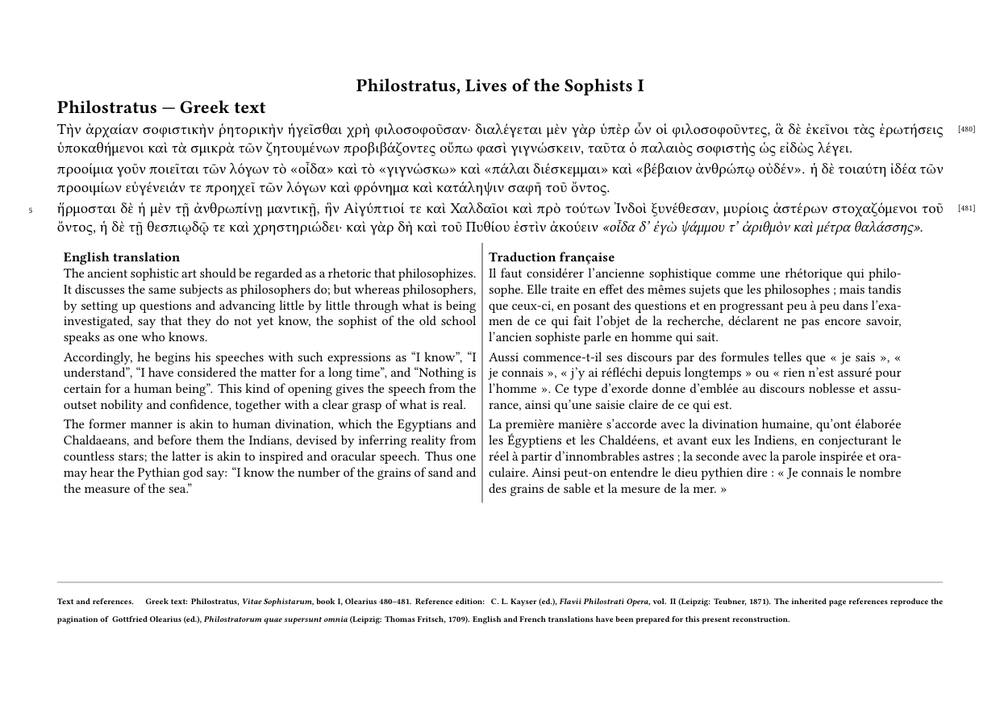
What the reconstruction makes visible.
The historical source and the present reconstruction remain deliberately distinct:
Thomas Schmitz, 2010             current reconstruction
        │                                  │
        ├── project TEI subset             ├── same project logic
        ├── placeholder text               ├── authentic Greek
        ├── Olearius references            ├── Olearius references
        └── XML → ConTeXt mapping          ├── English translation
                                           ├── French translation
                                           └── bibliographical data
The Greek text remains the primary layer. The English and French translations
are represented by separate <div type="translation"> elements
with their own xml:lang values and are composed in a slightly smaller
body size. That difference in size is a typographical decision made by ConTeXt,
not a semantic property of the TEI source.
The Olearius references remain encoded as
<pb ed="Olearius" n="480"/> and
<pb ed="Olearius" n="481"/>. They therefore survive as a
stable scholarly reference system independently of the pagination of the new
PDF.
The bibliographical note is also structured. Elements such as
<author>, <editor>, <title>,
<pubPlace>, <publisher>, and <date>
remain documentary data; the ConTeXt setup decides, for example, that a
<title level="m"> is rendered in italics.
This MWE does not attempt to reconstruct every structure already present in
Thomas Schmitz's 2010 XML, notably the full critical apparatus and all
<lg>/<l> material. Those richer critical-edition
problems are developed systematically in the six-guide series.
14.7. From the 2010 experiment to current TEI workflows
Thomas Schmitz's contribution and the current documentation can be read as a continuum rather than as competing approaches:
Thomas A. Schmitz, 2010
        │
        ▼
project-specific TEI subset
        │
        ▼
ConTeXt XML setups
        │
        ▼
scholarly typography
        │
        │ later XML and Lua developments
        ▼
current workflows
        │
        ├── direct XML mapping
        │
        └── Lua-assisted processing / validation
                    │
                    ▼
Building critical editions from TEI XML
                    │
                    ▼
Guides 1–6
The modern Building critical editions from TEI XML with ConTeXt series develops witness declaration, apparatus modelling, complex textual variation, Lua processing and validation, and final ConTeXt composition in a systematic sequence.
Historical continuity.
The code has changed, but the durable design principles are recognisable:
- process the TEI subset required by the project;
- keep documentary structure separate from visual presentation;
- map XML structures explicitly;
- preserve inherited scholarly reference systems as data;
- allow the XML model and the ConTeXt implementation to evolve together.
15. A cumulative map of the whole page
Stage 1 — semantic XML
TEI
 │
 ▼
structure + semantics
Stage 2 — explicit mapping
TEI
 │
 ▼
structure + semantics
 │
 ▼
XML selection + setups
Stage 3 — typography
TEI
 │
 ▼
structure + semantics
 │
 ▼
XML selection + setups
 │
 ▼
ConTeXt typography
 │
 ▼
page
Stage 4 — richer scholarly material
TEI
 │
 ├── languages
 ├── names
 ├── notes
 ├── verse
 ├── translation
 └── references
 │
 ▼
explicit mapping
 │
 ▼
ConTeXt page
Stage 5 — processing when required
TEI
 │
 ▼
XML access
 │
 ▼
Lua processing
 │
 ├── normalize
 ├── resolve
 ├── validate
 └── reorganize
 │
 ▼
ConTeXt
 │
 ▼
scholarly page
The central rule has not changed:
scholarly encoding
        │
        ▼
explicit interpretation
        │
        ▼
typographical realisation
16. Practical checklist
| Question | Why it matters |
|---|---|
| Which TEI elements does the project actually use? | Defines the project profile |
| Which attributes carry editorial information? | Prevents typography from guessing meaning |
| Which nodes can be mapped directly? | Keeps the ConTeXt XML layer simple |
| Which structures require Lua processing? | Introduces complexity only where needed |
| Does nested markup need to survive? | Helps choose between textual extraction and flushing |
| What is the alignment unit? | Prevents false parallelism |
| Which note series are required? | Keeps scholarly functions distinct |
| Which source references must remain visible? | Preserves stable scholarly reference systems |
| Which conventions belong to TEI? | Keeps documentary data explicit |
| Which conventions belong to ConTeXt? | Keeps typography replaceable |
17. Example sources and TEI resources
- TEI Guidelines examples
- TEI by Example
- eeditiones / tei-examples
- sample-tei-xml-files
- BVH TEI Manual
- EpiDoc
Reuse note.
When copying TEI examples from external projects or repositories, check their licence and attribution requirements.
18. Further reading
TEI
ConTeXt XML processing
- XML
- XML processing
- ConTeXt and Lua programming
- LuaMetaTeX
- Hans Hagen, XML in ConTeXt : xsteps-s.pdf
Historical context: Thomas A. Schmitz
- Thomas A. Schmitz — University of Bonn
- Thomas A. Schmitz, Greek support for the ConTeXt macro package (2007)
- GreekInContext.pdf
- ConTeXt User Meeting 2011 — xml in ConTeXt mkiv — tutorial for beginners
Critical editions
- Building critical editions from TEI XML with ConTeXt
- Building a critical apparatus with ConTeXt
- Glossary of terms used in the TEI XML critical edition guides
Languages and notes
19. See also
A French-language pedagogical introduction is available in the ConTeXt Wikibook: