Contents
Defining with \definemathmatrix
In order to type matrices in math formulas, there is the command \definemathmatrix. Once a certain type of matrix is defined, one can also add a simple command in order to type matrices in a Matlab or Scilab format.
Here are a few examples.
-
\setuplayout[scale=0.8,width=13cm]

\definemathmatrix[pmatrix]        % defining matrix with parentheses
	[matrix:parentheses]
	[simplecommand=pmatrix]

\definemathmatrix[bmatrix]        % defining matrix with brackets
	[matrix:brackets]
	[simplecommand=bmatrix]

\definemathmatrix[determinant]    % defining determinant with bars
	[matrix:bars]
	[simplecommand=thedeterminant]


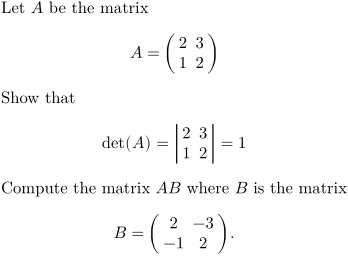
Let $A$ be the matrix
\startformula
A = \startpmatrix
       \NC 2 \NC 3 \NR
       \NC 1 \NC 2 \NR
     \stoppmatrix
\stopformula

Show that
\startformula
{\rm det}(A) = \startdeterminant
                 \NC 2 \NC 3 \NR
                 \NC 1 \NC 2 \NR
               \stopdeterminant   = 1
\stopformula

Compute the matrix $AB$ where $B$ is the matrix
\startformula
B = \pmatrix{2, -3 ; -1, 2}.
\stopformula
-
Formatting delimiters with left and right
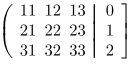
It is possible to have different delimiters on the left and on the right. For instance:
-
\definemathmatrix[pvmatrix]
	[left={\left(\thinspace},
	right={\thinspace\right|}]

\definemathmatrix[rpmatrix]
	[left={\left.\thinspace},
	right={\thinspace\right]}]

\startformula
	\startpvmatrix
		\NC 11 \NC 12 \NC 13 \NR
		\NC 21 \NC 22 \NC 23 \NR
		\NC 31 \NC 32 \NC 33 \NR
	\stoppvmatrix
	\startrpmatrix
		\NC  0 \NR
		\NC  1 \NR
		\NC  2 \NR
	\stoprpmatrix
\stopformula
-
Block matrices with vertical and/or horizontal lines
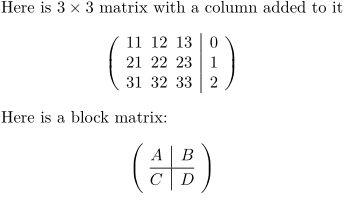
In ConTeXt LMTX beginning version 2020-11-27, it is possible to create « block » matrices where the blocks are separated by vertical or horizontal lines (respectively \VL and \HL). For instance the above example can be typeset more easily by the following :
-
\definemathmatrix[mymatrix]
	[left={\left\lparent\thinspace}, % instead of the left parenthesis, one can use any other fence
	right={\thinspace\right\rparent}] % instead of the right parenthesis, one can use any other fence

\starttext
Here is $3 \times 3$ matrix with a column added to it
\startformula
	\startmymatrix
		\NC 11 \NC 12 \NC 13 \VL 0 \NR
		\NC 21 \NC 22 \NC 23 \VL 1 \NR
		\NC 31 \NC 32 \NC 33 \VL 2 \NR
	\stopmymatrix
\stopformula
Here is a block matrix:
\startformula
	\startmymatrix
		\NC A \VL  B \NR
		\HL
		\NC C \VL  D \NR
	\stopmymatrix
\stopformula
-
Formatting lines
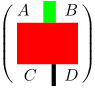
The two commands \VL and \HL take an optional parameter which defines the thickness of the rule and its color. So \HL[3,red] will produce a red horizontal rule three times thicker than the default matrix rule. The rule thickness for a specific matrix is defined with the [rulethickness=] parameter of \definemathmatrix.
-
\definemathmatrix[mymatrix][matrix:parentheses][rulethickness=2pt]

\starttext
\startformula
	\startmymatrix
		\NC A \VL[3,green]  B \NR
		\HL[10,red]
		\NC C \VL D \NR
	\stopmymatrix
\stopformula
-
Other formatting example
-
\definemathmatrix[mymatrix][matrix:parentheses]


Weird matrix
\startformula
	\startmymatrix
		\NC A \VL B \NR
		\HL[red]
		\NC C \NC D \NR
	\stopmymatrix
\stopformula
-

-
\definemathmatrix[mymatrix][matrix:parentheses]
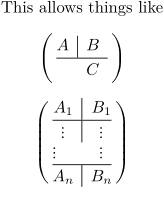
This allows things like

\startformula
	\startmymatrix
		\NC A \VL B \NR
		\HL
		\NC \NC C \NC \NR
	\stopmymatrix
\stopformula

\startformula
	\startmymatrix
		\NC A_1    \VL B_1    \NR
		\HL
		\NC \vdots \VL \vdots  \NR
		\NC \vdots \NC \vdots  \NR  % there is probably something from here
		\HL
		\NC A_n    \VL B_n    \NR
	\stopmymatrix
\stopformula
-
Border matrices with \startbordermatrix
-
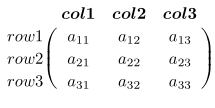
\startformula
\startbordermatrix
\NC       \NC {\bi col 1} \NC {\bi col 2} \NC {\bi col 3}\NR
\NC row 1 \NC a_{11}      \NC a_{12}      \NC a_{13}     \NR
\NC row 2 \NC a_{21}      \NC a_{22}      \NC a_{23}     \NR
\NC row 3 \NC a_{31}      \NC a_{32}      \NC a_{33}     \NR
\stopbordermatrix
\stopformula
-
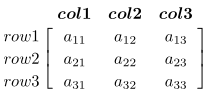
Use \startbordermatrix for a bracketed version:
-
\startformula
\startbbordermatrix
\NC       \NC {\bi col 1} \NC {\bi col 2} \NC {\bi col 3}\NR
\NC row 1 \NC a_{11}      \NC a_{12}      \NC a_{13}     \NR
\NC row 2 \NC a_{21}      \NC a_{22}      \NC a_{23}     \NR
\NC row 3 \NC a_{31}      \NC a_{32}      \NC a_{33}     \NR
\stopbbordermatrix
\stopformula
-