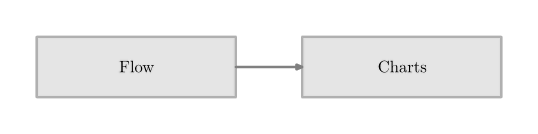
Context provides a charts module to create flow charts. The details are in the Charts uncovered manual by Pragma.
For example
-
\usemodule[chart]
\setupFLOWcharts[height=3\lineheight]

\startFLOWchart[example]
\startFLOWcell
  \name {flow}
  \location {1,1}
  \text {Flow}
  \connection [rl] {chart}
\stopFLOWcell
\startFLOWcell
  \name {chart}
  \location{2,1}
  \text {Charts}
\stopFLOWcell
\stopFLOWchart
\FLOWchart[example]
-
The more sophisticated example:
-
\usemodule[chart]
\setuppapersize[A2]

\setupFLOWcharts
[nx=5,
ny=3,
dx=2\bodyfontsize,
dy=2\bodyfontsize,
maxwidth=\textwidth
]

\setupFLOWshapes
[framecolor=black,
background=color,
backgroundcolor=white,
]

\startFLOWchart[DSP]

	\startFLOWcell
	\name{input}
	\location{1,1}
	\shape{44}
	\connection[rl] {lowpass1}
	\comment[t]{$x(t)$}
	\comment[b]{$X(t)$}
	\stopFLOWcell

	\startFLOWcell
	\name {lowpass1}
	\location {2,1}
	\text {Low Pass\crlf Filter}
	\connection[bt] {adconv}
	\comment[r]{$x_f(t)$}
	\comment[l]{$X_f(t)$}
	\stopFLOWcell

	\startFLOWcell
	\name{adconv}
	\location{2,2}
	\text{Analog/Digital\crlf conversion}
	\connection[rl]{dsp}
	\comment[t]{$x[n]$}
	\comment[b]{$X(\Omega)$}
	\stopFLOWcell

	\startFLOWcell
	\name{dsp}
	\location{3,2}
	\text{Digital Signal\crlf Processing}
	\connection[rl]{daconv}
	\comment[t]{$y[n]$}
	\comment[b]{$Y(\Omega)$}
	\stopFLOWcell

	\startFLOWcell
	\name{daconv}
	\location{4,2}
	\text{Digital/Analog\crlf Conversion}
	\connection[bt]{lowpass2}
	\comment[r]{$y_d(t)$}
	\comment[l]{$Y_d(t)$}
	\stopFLOWcell

	\startFLOWcell
	\name {lowpass2}
	\location {4,3}
	\text {Low Pass\crlf Filter}
	\connection[rl]{output}
	\comment[t]{$y_f(t)$}
	\comment[b]{$Y_f(t)$}
	\stopFLOWcell

	\startFLOWcell
	\name {output}
	\location {5,3}
	\shape{44}
	\stopFLOWcell

\stopFLOWchart

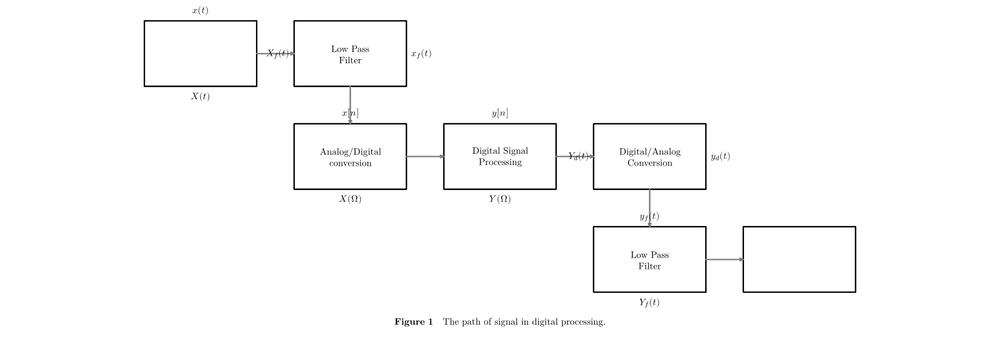
\placefigure[here][fig:chart]{The path of signal in digital processing.}
{
	\FLOWchart[DSP]
}
-
Contents
Changing the appearance of cells (background color, rule thickness)
It is possible to have each cell with its own color and its own rule thickness. For example
-
\usemodule[chart]
\setupFLOWcharts[height=3\lineheight]

\startFLOWchart[example-Cell]
\startFLOWcell[background=color,backgroundcolor=yellow,rulethickness=5pt]
  \name {flow}
  \location {1,1}
  \text {Flow}
  \connection [rl] {chart}
\stopFLOWcell
\startFLOWcell[background=color,backgroundcolor=lightblue]
  \name {chart}
  \location{2,1}
  \text {Charts}
\stopFLOWcell
\stopFLOWchart
\FLOWchart[example-Cell]
-
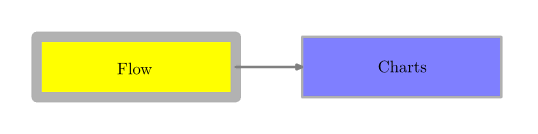
As a matter of fact, there is no need for "background=color" because each cell already has a background color by default.
Syntax for \connection
\connection [<from><to>] {<FLOWcell>}
<from> and <to> are the points from which point to which point the connection should be drawn. The following graphic depicts the names of the points.
       -t    t    +t
     ----------------
 +l |                | +r
    |                |
  l |                |  r
    |                |
 -l |                | -r
    |                |
     ----------------
       -b    b    +b
Example
The following code draws a line from the left top point of the current cell to the right bottom point of cell foobar.
\connection [-t+b] {foobar}
The code for connections in the pdf manual, e.g.
\connection[nb,pt]{episode_02_title}
No longer works
Aligning text within the cell
To align left or right, use
\text[l]{left}
\text[r]{right}
Forcing a paragraph break with \par in a cell does not work...
\text[l]{firstline \par secondline}
Whereas using \\ does work, so:
\text[l]{firstline \\ secondline}
Further hints
- Charts uncovered manual
- There was a Flowchart creater to create flowchart code using javascript, but it disappeared.
- The nodes module covers even more applications of charts.