Contents
How to identify and use the position of content on the page
Here are first commands (anch-pos.mkiv):
- \xypos simple position with no dimensions
- \hpos position and characteristics of a \hbox
- \vpos position and characteristics of a \vbox
- \bpos begin point in a line
- \epos end point in a line
Here is an example where
-
in the text we locate a segment of text on the content with
\hpos
{locA}{…
},
locAbeing the chosen label -
\startuseMPgraphic
is used to prepare a graphic to be used as an overlay of the page. In this graphic, we use several ConTeXt's commands
- \MPll {locA } to access to the Lower Left corner of the segment of text. We also use \MPlr {locA } \MPur {locA } \MPul {locA } to draw the complete box.
- \MPx {locA } and \MPx {locA } to locate the baseline entry point
- \MPd {locA } and \MPh {locA } to also locate the point the depth below the entry point, and the point the height above the entry point (depth means depth of the segment of text, and height means height of the segment of text).
- \MPw {locA } provides the width of the segment of text.
-
\setupheadertexts[]
\setuppapersize[A8,landscape]
\setupbodyfont[48pt]

\startuseMPgraphic{MPMyPage}
StartPage ;
draw
  \MPll{locA} -- \MPlr{locA} --
  \MPur{locA} -- \MPul{locA} -- cycle
  withpen pencircle scaled 5pt
  withcolor transparent(1,0.5,blue);

draw
  (\MPx{locA},\MPy{locA})
  withpen pencircle scaled 5pt
  withcolor red ;

draw
  (\MPx{locA},\MPy{locA} - \MPd{locA})
  withpen pencircle scaled 5pt
  withcolor green;

draw
  (\MPx{locA},\MPy{locA} + \MPh{locA})
  withpen pencircle scaled 5pt
  withcolor green;


draw
  (\MPx{locA} + \MPw{locA},\MPy{locA})
  withpen pencircle scaled 5pt
  withcolor magenta ;

StopPage ;
\stopuseMPgraphic

\defineoverlay
  [OLMyPage]
  [\useMPgraphic{MPMyPage}]

\setupbackgrounds
  [page]
  [background=OLMyPage]

\starttext

a \hpos{locA}{\TeX}.

\stoptext
-

LuaMetaFun version
With MetaPost commands
- positionbox("label")
- positionxy("label")
-
positionwhd("label") associated with
- dppart
- htpart
- wdpart (but issue currently)
And you can also replace \hpos{locA} by a region=locA parameter.
-
\setupheadertexts[]
\setuppapersize[A8,landscape]
\setupbodyfont[48pt]

\startuseMPgraphic{MPMyPage}
StartPage ;
draw
  positionbox("locA")
  withpen pencircle scaled 5pt
  withcolor transparent(1,0.5,blue);

draw
  positionxy("locA")
  withpen pencircle scaled 5pt
  withcolor red ;

draw
  (positionx("locA"), positiony("locA") - (dppart positionwhd("locA")))
  withpen pencircle scaled 5pt
  withcolor green;

draw
  (positionx("locA"), positiony("locA") + (htpart positionwhd("locA")))
  withpen pencircle scaled 5pt
  withcolor green;

StopPage ;
\stopuseMPgraphic

\defineoverlay
  [OLMyPage]
  [\useMPgraphic{MPMyPage}]

\setupbackgrounds
  [page]
  [background={foreground,OLMyPage}]

\starttext

a
\framed
  [region=locA,
   offset=overlay,
   frame=off]{\TeX}.
% a \hpos{locA}{\TeX}.

\stoptext
-

How to draw links between words on the page
-
\setupheadertexts[]
\setuppapersize[A8]
\setupbodyfont[16pt]
\setupalign[tolerant]

\startuseMPgraphic{MPMyPage}
StartPage ;

path pa, pb;
pa := (\MPll{locA} -- \MPlr{locA} --
       \MPur{locA} -- \MPul{locA} -- cycle)
      enlarged 2pt;
pb := (\MPll{locB} -- \MPlr{locB} --
       \MPur{locB} -- \MPul{locB} -- cycle)
      enlarged 2pt;

draw pa
  withpen pencircle scaled 3pt
  withcolor transparent(1,0.5,blue);

draw pb
  withpen pencircle scaled 3pt
  withcolor transparent(1,0.5,blue);

drawdblarrow (center pa) .. (center pb)
  withpen pencircle scaled 3pt
  withcolor transparent(1,0.5,red);

StopPage ;
\stopuseMPgraphic

\defineoverlay
  [OLMyPage]
  [\useMPgraphic{MPMyPage}]

\setupbackgrounds
  [page]
  [background={foreground,OLMyPage}]
  % HERE overlay over the foreground.

\starttext

The \hpos{locA}{\LUA} word can be linked,
thanks to the \tex{hpos} command,
to the \hpos{locB}{\TeX} word!

\stoptext
-
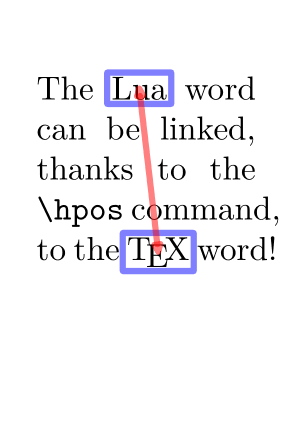
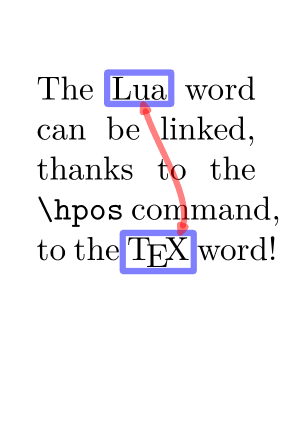
The drawing of the arrow can be slightly improved
-
\setupheadertexts[]
\setuppapersize[A8]
\setupbodyfont[16pt]
\setupalign[tolerant]

\startuseMPgraphic{MPMyPage}
StartPage ;

path pa, pb, pab;
pa  := (\MPll{locA} -- \MPlr{locA} --
        \MPur{locA} -- \MPul{locA} -- cycle)
       enlarged 2pt;
pb  := (\MPll{locB} -- \MPlr{locB} --
        \MPur{locB} -- \MPul{locB} -- cycle)
       enlarged 2pt;
pab := (center pa){dir(-80)} ..
       (center pb){dir(-155)};

draw pa
  withpen pencircle scaled 3pt
  withcolor transparent(1,0.5,blue);

draw pb
  withpen pencircle scaled 3pt
  withcolor transparent(1,0.5,blue);

pab := pab cutbefore (pab intersectionpoint pa) ;
pab := pab cutafter  (pab intersectionpoint pb) ;

drawdblarrow pab
  withpen pencircle scaled 3pt
  withcolor transparent(1,0.5,red);

StopPage ;
\stopuseMPgraphic

\defineoverlay
  [OLMyPage]
  [\useMPgraphic{MPMyPage}]

\setupbackgrounds
  [page]
  [background={foreground,OLMyPage}]

\starttext

The \hpos{locA}{\LUA} word can be linked,
thanks to the \tex{hpos} command,
to the \hpos{locB}{\TeX} word!

\stoptext
-
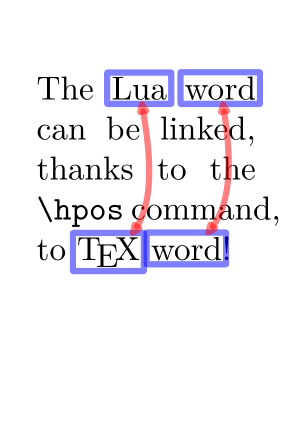
Generalise to several pairs of words
-
MetaPost side
- \startMPpositiongraphic (you don't need StartPage)
- \MPvar to access the parameters of the \setMPpositiongraphic command
- \setMPpositiongraphic to pass the parameters to \startMPpositiongraphic
- Overlay side
-
\setupheadertexts[]
\setuppapersize[A8]
\setupbodyfont[16pt]
\setupalign[tolerant]

\startMPpositiongraphic{MPMyPage}
StartPage ;

path pa, pb, pab;
pa  := (\MPll{\MPvar{from}} -- \MPlr{\MPvar{from}} --
        \MPur{\MPvar{from}} -- \MPul{\MPvar{from}} -- cycle)
       enlarged 2pt;
pb  := (\MPll{\MPvar{to}} -- \MPlr{\MPvar{to}} --
        \MPur{\MPvar{to}} -- \MPul{\MPvar{to}} -- cycle)
       enlarged 2pt;
pab := (center pa){dir(-80)} ..
       (center pb){dir(-155)};

draw pa
  withpen pencircle scaled 3pt
  withcolor transparent(1,0.5,blue);

draw pb
  withpen pencircle scaled 3pt
  withcolor transparent(1,0.5,blue);

pab := pab cutbefore (pab intersectionpoint pa) ;
pab := pab cutafter  (pab intersectionpoint pb) ;

drawdblarrow pab
  withpen pencircle scaled 3pt
  withcolor transparent(1,0.5,red);

StopPage ;
\stopMPpositiongraphic

\startpositionoverlay{POLarrows}
\setMPpositiongraphic{locA}{MPMyPage}{to=locB}
\setMPpositiongraphic{locC}{MPMyPage}{to=locD}
\stoppositionoverlay

\defineoverlay[OLMyPage][\positionoverlay{POLarrows}]

\setupbackgrounds
  [page]
  [background={foreground,OLMyPage}]

\starttext

The \hpos{locA}{\LUA} \hpos{locC}{word} can be linked,
thanks to the \tex{hpos} command,
to \hpos{locB}{\TeX} \hpos{locD}{word}!

\stoptext
-
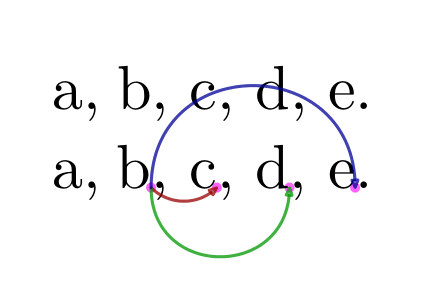
Anchors within frames
Anchors allows to work with positioning of specif points within a frame. You can use anchors with the following commands:
- in the content: \markanchor {label}{numberA}{numberB }. You can just use numberA numberB as zero, but it can be useful, for one same label, to also have two figures to refer to others anchors with the same label but with different 2D positions).
-
in MetaPost:
anchorxy("label", numberA, numberB). - for the frame using the MetaPost graphic as an overlay: \framed [synchronize=yes,background={…}] , synchronize being needed to update the positions of the anchors at each run.
-
\setupheadertexts[]
\setuppapersize[A8,landscape]
\setupbodyfont[30pt]

\startuseMPgraphic{MPpoints}
pickup pencircle scaled 5pt ;
color mycolor; mycolor := magenta  ;
draw anchorxy("one", 0, 1)
     withcolor mycolor withtransparency (1,.6);
draw anchorxy("one", 0, 2)
     withcolor mycolor withtransparency (1,.6);
draw anchorxy("one", 0, 3)
     withcolor mycolor withtransparency (1,.6);
draw anchorxy("two", 0, 1)
     withcolor mycolor withtransparency (1,.6);
setbounds currentpicture to OverlayBox ;
\stopuseMPgraphic

\startuseMPgraphic{MParrows}
pickup pencircle scaled 1.5pt ;
drawarrow
    anchorxy("one", 0, 1) {dir -45} ..
    anchorxy("one", 0, 2)
    withcolor "darkred" withtransparency (1,.75) ;
drawarrow
    anchorxy("one", 0, 1) {down} ..
    anchorxy("one", 0, 3)
    withcolor "darkgreen" withtransparency (1,.75) ;
drawarrow
    anchorxy("one", 0, 1) {up} ..
    anchorxy("two", 0, 1)
    withcolor "darkblue" withtransparency (1,.75) ;
setbounds currentpicture to OverlayBox ;
\stopuseMPgraphic

\defineoverlay [OLback]  [\useMPgraphic{MPpoints}]
\defineoverlay [OLfront] [\useMPgraphic{MParrows}]

\setupframed
  [offset=0pt,
   strut=yes,
   location=top,
   frame=off]

\starttext

a, \framed{b, c, d, e.}

a, \framed[synchronize=yes,
           background={OLback,foreground,OLfront}]
   {b\markanchor{one}{0}{1},
    c\markanchor{one}{0}{2},
    d\markanchor{one}{0}{3},
    e\markanchor{two}{0}{1}.}

\stoptext
-
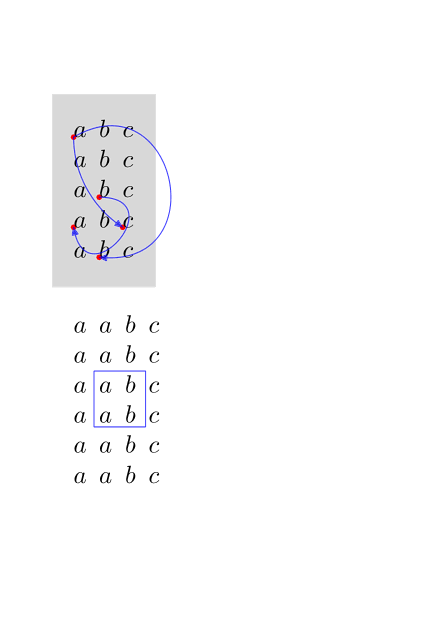
With matrices - example 1
-
\setupheadertexts[]
\setuppapersize[A7]
\setupbodyfont[12pt]
\starttext

\startuseMPgraphic{whatever-1}
fill OverlayBox withcolor "lightgray" ;
drawdot anchorxy("one", 0, 1)
    withpen pencircle scaled 1mm
    withcolor "red" ;
drawdot anchorxy("one", 0, 2)
    withpen pencircle scaled 1mm
    withcolor "red" ;
drawdot anchorxy("two", 0, 1)
    withpen pencircle scaled 1mm
    withcolor "red" ;
drawdot anchorxy("two", 0, 2)
    withpen pencircle scaled 1mm
    withcolor "red" ;
drawdot anchorxy("three", 0, 1)
    withpen pencircle scaled 1mm
    withcolor "red" ;
setbounds currentpicture to OverlayBox ;
\stopuseMPgraphic

\startuseMPgraphic{whatever-2}
pair a ; a := anchorxy("one", 0, 1) ;
pair b ; b := anchorxy("one", 0, 2) ;
drawarrow
    anchorxy("one", 0, 1) { right } ..
    anchorxy("one", 0, 2)
    withcolor "blue" withtransparency (1,.75) ;
drawarrow
    anchorxy("two", 0, 1) { down } ..
    anchorxy("two", 0, 2)
    withcolor "blue" withtransparency (1,.75) ;
drawarrow
    anchorxy("two", 0, 1) { dir 30 } ..
    anchorxy("three", 0, 1)
    withcolor "blue" withtransparency (1,.75) ;
setbounds currentpicture to OverlayBox ;
\stopuseMPgraphic

\defineoverlay[whatever-1][\useMPgraphic{whatever-1}]
\defineoverlay[whatever-2][\useMPgraphic{whatever-2}]

\framed
   [synchronize=yes,
    align=normal,
    offset=10pt,
    frame=off,
    background={whatever-1,foreground,whatever-2}]
   {\startmathmatrix
       \NC \markanchor{two}{0}{1}a \NC b                         \NC c                       \NR
       \NC a                       \NC b                         \NC c                       \NR
       \NC a                       \NC \markanchor{one}{0}{1}b   \NC c                       \NR
       \NC \markanchor{one}{0}{2}a \NC b                         \NC \markanchor{two}{0}{2}c \NR
       \NC a                       \NC \markanchor{three}{0}{1}b \NC c                       \NR
   \stopmathmatrix}

\startuseMPgraphic{whatever-3}
     pair a ; a := anchorxy("a", 0, 1) ;
     pair b ; b := anchorxy("a", 0, 2) ;
     draw boundingbox (a--b)
         leftenlarged .25EmWidth
         rightenlarged EmWidth
         topenlarged StrutHeight
         bottomenlarged .5StrutDepth
         withcolor "blue" withtransparency (1,.75) ;
     setbounds currentpicture to OverlayBox ;
\stopuseMPgraphic

\defineoverlay[whatever-3][\useMPgraphic{whatever-3}]

\framed
   [synchronize=yes,
    align=normal,
    offset=10pt,
    frame=off,
    background=whatever-3]
   {\startmathmatrix
       \NC a \NC                     a \NC                       b \NC c\NR
       \NC a \NC                     a \NC                       b \NC c\NR
       \NC a \NC \markanchor{a}{0}{1}a \NC                       b \NC c\NR
       \NC a \NC                     a \NC \markanchor{a}{0}{2}  b \NC c\NR
       \NC a \NC                     a \NC                       b \NC c\NR
       \NC a \NC                     a \NC                       b \NC c\NR
   \stopmathmatrix}

\stoptext
-
With matrices - example 2
-
\setupheadertexts[]
\setuppapersize[A7]
\setupbodyfont[13pt]
\starttext

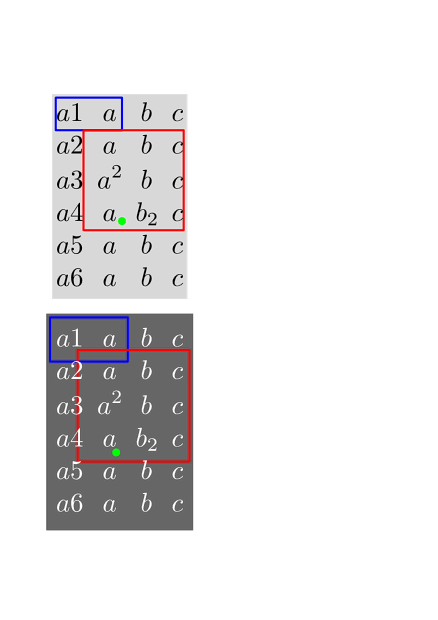
\startuseMPgraphic{whatever-5}
fill OverlayBox withcolor "lightgray" ;
draw matrixbox (1, 1) (2, 1)
     withpen pencircle scaled 1pt withcolor "blue" ;
draw matrixbox (2, 2) (4, 4)
     withpen pencircle scaled 1pt withcolor "red" ;
draw anchorxy("matrix", 3, 4)
     withpen pencircle scaled 4pt withcolor "green";
setbounds currentpicture to OverlayBox ;
\stopuseMPgraphic

\defineoverlay[whatever-5][\useMPgraphic{whatever-5}]

\framed
  [synchronize=background,
   align=normal,
   frame=off,
   background=whatever-5]
  {\setmathmatrixanchoring[both]% left|right|both|yes
%   {\setmathmatrixanchoring[right]% left|right|both|yes
   \startmathmatrix
      \NC a1 \NC a   \NC b   \NC c\NR
      \NC a2 \NC a   \NC b   \NC c\NR
      \NC a3 \NC a^2 \NC b   \NC c\NR
      \NC a4 \NC a   \NC b_2 \NC c\NR
      \NC a5 \NC a   \NC b   \NC c\NR
      \NC a6 \NC a   \NC b   \NC c\NR
  \stopmathmatrix}

\startuseMPgraphic{whatever-5}
fill OverlayBox withcolor "darkgray" ;
draw matrixbox (1, 1) (2, 1)
     enlarged OverlayOffset
     shifted paired(OverlayOffset)
     withpen pencircle scaled 1pt withcolor "blue" ;
draw matrixbox (2, 2) (4, 4)
     enlarged OverlayOffset
     shifted paired(OverlayOffset)
     withpen pencircle scaled 1pt withcolor "red" ;
draw anchorxy("matrix", 3, 4)
     withpen pencircle scaled 4pt withcolor "green";
setbounds currentpicture to OverlayBox ;
\stopuseMPgraphic

\blank

\framed
  [synchronize=background,
   align=normal,
   frame=off,
   background=whatever-5,
   backgroundoffset=.5ex,
   foregroundcolor=white]
  {\setmathmatrixanchoring[yes]% left|right|both|yes
   \startmathmatrix
      \NC a1 \NC a   \NC b   \NC c\NR
      \NC a2 \NC a   \NC b   \NC c\NR
      \NC a3 \NC a^2 \NC b   \NC c\NR
      \NC a4 \NC a   \NC b_2 \NC c\NR
      \NC a5 \NC a   \NC b   \NC c\NR
      \NC a6 \NC a   \NC b   \NC c\NR
  \stopmathmatrix}

\stoptext
-
See also
- MetaFun reference manual, 5. Positional graphics .
- LuaMetaFun reference manual, 23.8.3 Positions .
- on ntg-context@ntg.nl new upload May 2021.