ConTeXt provides a higher layer of API to access various counters. For example, to set the page number to a certain value use \setcounter:
\setcounter[userpage][1]
Other useful commands for working with counters are
- \resetcounter
- \incrementcounter
- \decrementcounter
- \savecounter
- \restorecounter
- \rawcountervalue (not \getcounter)
- \setupheadnumber
Names of Commonly Used Counters
-
userpagefor visible pagenumbers -
pagefor internal pagenumbers -
formulafor formula numbers -
tablefor table numbers -
figurefor figure numbers
Testing the Value of a Counter
If you need to test the value of a counter, use \rawcountervalue (the is no \getcounter):
-
\definecounter [mynumber] []
\setcounter [mynumber] [42]

\doifelse
  {\rawcountervalue[mynumber]}
  {42}
  {First test is OK}
  {Failed}
results in:
-

Coupling Counters
Two counters can be coupled by
 \definecounter[one]
 \definecounter[two][one]
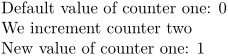
For example
-
\definecounter[one]
\definecounter[two][one]

Default value of counter one:
\rawcountervalue[one]

We increment counter two
\incrementcounter[two]

New value of counter one:
\rawcountervalue[one]
-
By default counters are reset with each new chapter. To have a counter which isn’t reset you need way=bytext, and to remove the chapter number from the \getcounter result you have to add prefix=no.
Example definition:
\definecounter[examplecounter][way=bytext,prefix=no]