Contents
Summary
The command \setupcaption is used to set up the caption for a specific kind of float. To set up captions for all floats, use \setupcaptions.
Settings
| \setupcaption[...,...][...=...,...] | |
| [...,...] | name |
| suffix | command |
| suffixseparator | command |
| suffixstopper | command |
| location | left right middle low high grid lines overlay inner outer innermargin outermargin leftmargin rightmargin lefthanging righthanging hang top bottom stretch tolerant verytolerant none default |
| command | oneargument |
| numbercommand | oneargument |
| textcommand | oneargument |
| spacebefore | see \blank |
| spaceinbetween | see \blank |
| spaceafter | see \blank |
| distance | dimension |
| headstyle | style command |
| headcolor | color |
| headseparator | text |
| inbetween | command |
| style | style command |
| color | color |
| topoffset | dimension |
| bottomoffset | dimension |
| number | yes no none |
| group | text |
| leftmargin | dimension |
| rightmargin | dimension |
| innermargin | dimension |
| outermargin | dimension |
| align | see \setupalign |
| width | fit max dimension |
| minwidth | fit dimension |
| maxwidth | dimension |
| hang | yes no |
| ...=...,... | inherits from \setupcounter |
| ...=...,... | inherits from \setupframed |
Description
Examples
Example 1
-
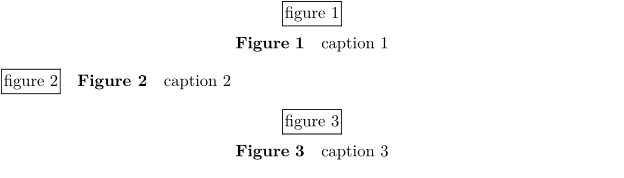
\definefloat[rightfigure][rightfigure][figure]

\setupcaption[rightfigure][location=right]

\placefigure{caption 1}{\framed{figure 1}}
\placerightfigure{caption 2}{\framed{figure 2}}
\placefigure{caption 3}{\framed{figure 3}}
-