Contents
Summary
The command \letterspacing is used to highlight text with added kerning.
Settings
Description
\letterspacing
is an instance of
characterkerning
(see
\definecharacterkerning
) and an alias of
\kerncharacters
. The default value is 0.125.
Examples
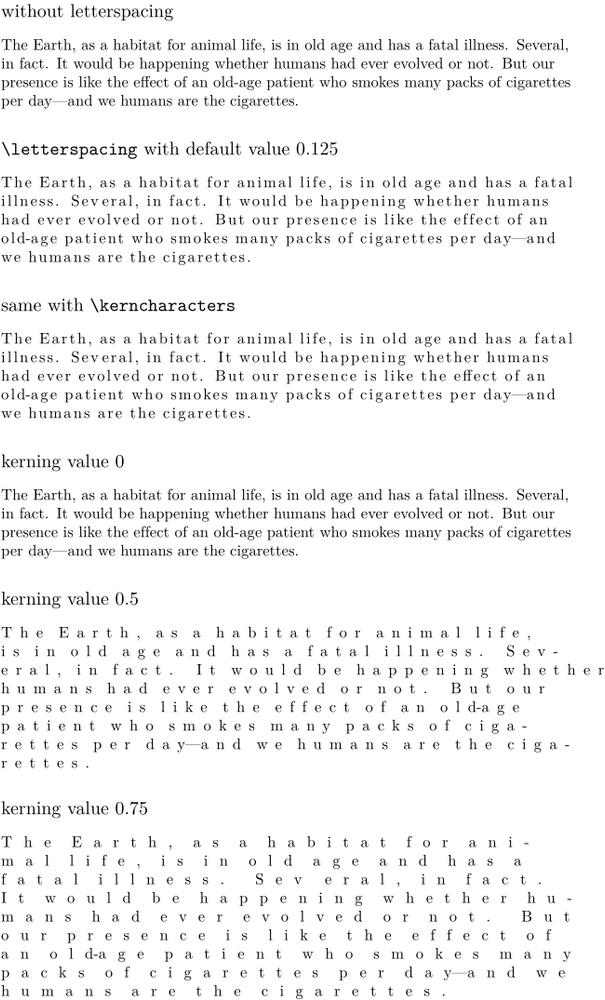
Example 1
-
\setupalign[flushleft]

\subject{without letterspacing}
\samplefile{ward}

\subject{\tex{letterspacing} with default value 0.125}
\letterspacing{\samplefile{ward}}

\subject{same with \tex{kerncharacters}}
\kerncharacters{\samplefile{ward}}

\subject{kerning value 0}
\letterspacing[0]{\samplefile{ward}}

\subject{kerning value 0.5}
\letterspacing[0.5]{\samplefile{ward}}

\subject{kerning value 0.75}
\letterspacing[.75]{\samplefile{ward}}
-
Issue that should be solved with upcoming update (current date 2025.03.18)
-
\startTEXpage[offset=1em]
  \letterspacing[1]{RELATIVE}\par
  \letterspacing[1]{\nokerning RELATIVE}   % temporary solution
\stopTEXpage
-
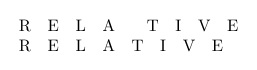
How to keep readability ?
Source: tex.stackexchange (2025)
The kerns within words grow linearly, proportionally to the emwidth. The spaces grow faster than that. It depends on the font (for latin modern we get (em/3) + 4 * (em/3) * factor, where em is the emwidth and factor is the factor you set up).
So you can play with \spaceskip to increase the effect on spaces.
-
\setupbodyfont[ebgaramond,20pt]
\starttext
\startTEXpage[offset=1em]

                                     {THE GRAND DESIGN} \par
                  \letterspacing[.16]{THE GRAND DESIGN} \par
{\spaceskip=.40em \letterspacing[.16]{THE GRAND DESIGN}}\par

\stopTEXpage
\stoptext
-

Second solution, play with \setupcharacterkerning
-
\setupbodyfont[ebgaramond,20pt]
\starttext
\startTEXpage[offset=1em]

                   {THE GRAND DESIGN} \par
\letterspacing[.16]{THE GRAND DESIGN}

\setupcharacterkerning
  [letterspacing]
  [style=\spaceskip\dimexpression{6.0\spaceamount*\characterkerningparameter{factor}+\spaceamount}]

\letterspacing[.16]{THE GRAND DESIGN}

\stopTEXpage
\stoptext
-