Contents
Summary
There are several variants of underlining predefined.
Instances
| \overbar | for a continuous rule above every line. Not be confused with \overbarin math mode mathovertextextensible |
| \underbar | for a continuous rule below every line. Not be confused with \underbarin math mode mathundertextextensible |
| \overstrike | for a continuous rule through every line. |
| \understrike | background color behind the line, like with a marker pen |
| \overbars | for a rule above every word. |
| \underbars | for a rule under every word. |
| \overstrikes | for a continuous rule through every word. |
| \understrikes | background color for every word. |
| \underrandom | irregular (randomized) underlining. |
| \underrandoms | irregular underlining for every word. |
| \underdash | dashed underlining. |
| \underdashes | dashed underlining for every word. |
| \underdot | dotted underlining. |
| \underdots | dotted underlining for every word. |
| \nobar | |
| \hiddenbar |
Settings instance
Description
Examples
Default style and math
-
\underbar{This is an example. $c = \sqrt{a^2 + b^2}$}

\underbar{\input ward}
gives:
- internal error: convert failed
Nested bars
-
\setupbar[color=red]

\underbar{A \underbar{B \underbar{Cc} b} a}\blank

\underbar{A \underdot{B \underdash{Cc} b} a}\blank

\underrandoms{A \overbar{B \underrandoms{Cc} b} a}\blank
gives:
-
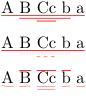
In MkIV only bars of the same kind were nestable (stacking), in LMTX also mixed.
Overstrike
Draw a rule through every line of the text.
-
\overstrike{This is an example. $c = \sqrt{a^2 + b^2}$}

\overstrike{\samplefile{ward}}
gives:
-

If you are using microtypography with \setupalign[hz,hanging], then with some fonts the rule may end up off-target, above the characters instead of through them. (The problem was experienced with Linux Libertine and MkIV, and not with Latin Modern.) The workarounds are:
-
Put the overstriked text in a
\inframed[frame=off]{}. Example:
\setupalign[hanging,hz]
bla bla bla \inframed[frame=off]{\overstrike{striked}} bla bla
- Turn off microtypography for the paragraph containing the overstrike. Example:
\setupalign[nothanging,nohz]
bla bla bla \overstrike{striked} bla bla

\setupalign[hanging,hz]
bla bla bla bla bla
Various parameters demo
-
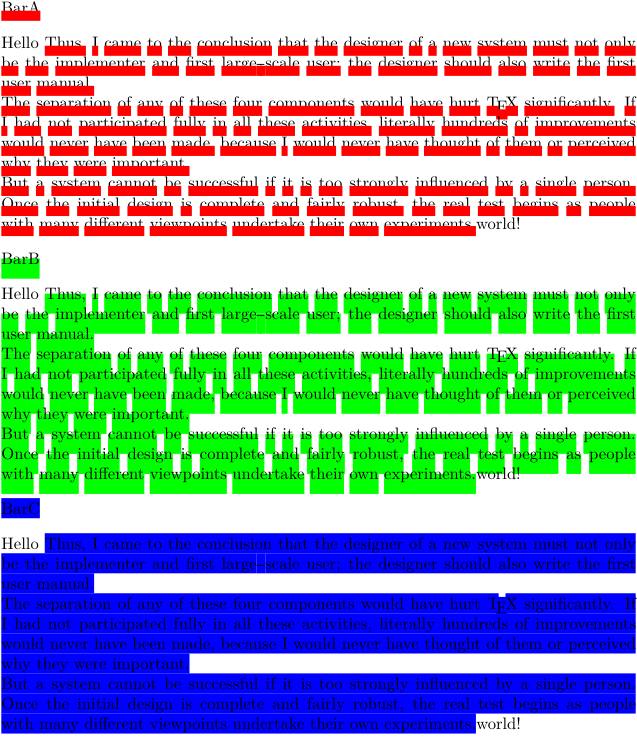
\definebar[BarA][color=red,rulethickness=1.4]

\BarA{BarA}
\blank
Hello \startbar[BarA]\samplefile{knuth}\stopbar world!
\blank

\definebar[BarB][color=green,rulethickness=2.8,order=background]

\BarB{BarB}
\blank
Hello \startbar[BarB]\samplefile{knuth}\stopbar world!
\blank

\definebar[BarC][color=blue,rulethickness=2.8,order=background,offset=1.5,continue=yes]

\BarC{BarC}
\blank
Hello \startbar[BarC]\samplefile{knuth}\stopbar world!
\blank
gives:
-
Underbar for clozes
-
\definebar[ClozeBar][underbar][continue=yes, color=black, offset=-0.5]

\starttexdefinition unexpanded Cloze #1
   \startbar[ClozeBar]
   \scratchdimen\widthofstring{#1}\relax
   \zwj\kern.2\scratchdimen #1 \kern.2\scratchdimen\zwj
   \stopbar
\stoptexdefinition

\startTEXpage
This is a \Cloze{\color[red]{cloze}} whose underbar is 1.4 times as wide as the text above it. \Cloze{The leading} and trailing spaces are never broken.
\stopTEXpage
gives:
-

Wavy underbar using MetaPost
-
\startuseMPgraphic{rules:under:wavy}
    mo := RuleThickness*10;
    wav := 1.5*RuleThickness;
    path p;
    p := (wav, RuleDepth - wav){dir 45}
        for i := 1 upto RuleWidth/mo:
            ... (mo * i - 2*wav,RuleDepth + wav) ... {dir -45}(mo * i,RuleDepth - wav)
        endfor;
    draw p
        shifted (0,RuleFactor*RuleOffset)
        withpen pencircle scaled 1.5RuleThickness
        withcolor RuleColor ;
    setbounds currentpicture to unitsquare xysized(RuleWidth,RuleHeight) ;
\stopuseMPgraphic

\definebar[underwavy][undergraphic][mp=rules:under:wavy]

This is a \underwavy{wavy underbar}.
gives:
-

Rounded highlight with MetaPost
-
% Hans Hagen on the mailing list, 2026-02-08
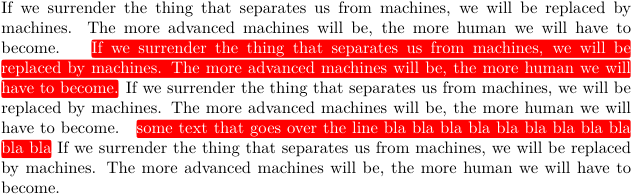
\definebar[mybar][
  color=red,
  continue=yes,
  method=3,
  foregroundcolor=white,
  mp=mybar:round,
  order=reverse,
]

\startuseMPgraphic{mybar:round}
fill (
  (0,                      .1ExHeight) --
  (RuleWidth,              .1ExHeight) --
  (RuleWidth, LineHeight - .1ExHeight) --
  (0,         LineHeight - .1ExHeight) --
  cycle
) shifted (0,-StrutDepth+RuleDepth)
  cornered  .5ExHeight
  withcolor RuleColor
;
\stopuseMPgraphic

\samplefile{jojomayer}
\mybar{\samplefile{jojomayer}\removeunwantedspaces}
\samplefile{jojomayer}
\mybar{some text that goes over the line bla bla bla bla bla bla bla bla bla bla bla}
\samplefile{jojomayer}
gives:
-
Notes
See also
- \definebar
- \setupbar
- node-rul.mkiv
- rules-mkiv.pdf Everything about rules (lines)
Help from ConTeXt-Mailinglist/Forum
All issues with:
- \overbar on the mailing list (all results)
- \overbar on the mailing list (subject only)
- \overbar on stack exchange
- \overbar in ConTeXt's source
- \underbar on the mailing list (all results)
- \underbar on the mailing list (subject only)
- \underbar on stack exchange
- \underbar in ConTeXt's source
- \overstrike on the mailing list (all results)
- \overstrike on the mailing list (subject only)
- \overstrike on stack exchange
- \overstrike in ConTeXt's source
- \understrike on the mailing list (all results)
- \understrike on the mailing list (subject only)
- \understrike on stack exchange
- \understrike in ConTeXt's source
- \overbars on the mailing list (all results)
- \overbars on the mailing list (subject only)
- \overbars on stack exchange
- \overbars in ConTeXt's source
- \underbars on the mailing list (all results)
- \underbars on the mailing list (subject only)
- \underbars on stack exchange
- \underbars in ConTeXt's source
- \overstrikes on the mailing list (all results)
- \overstrikes on the mailing list (subject only)
- \overstrikes on stack exchange
- \overstrikes in ConTeXt's source
- \understrikes on the mailing list (all results)
- \understrikes on the mailing list (subject only)
- \understrikes on stack exchange
- \understrikes in ConTeXt's source
- \underrandom on the mailing list (all results)
- \underrandom on the mailing list (subject only)
- \underrandom on stack exchange
- \underrandom in ConTeXt's source
- \underrandoms on the mailing list (all results)
- \underrandoms on the mailing list (subject only)
- \underrandoms on stack exchange
- \underrandoms in ConTeXt's source
- \underdash on the mailing list (all results)
- \underdash on the mailing list (subject only)
- \underdash on stack exchange
- \underdash in ConTeXt's source
- \underdashes on the mailing list (all results)
- \underdashes on the mailing list (subject only)
- \underdashes on stack exchange
- \underdashes in ConTeXt's source
- \underdot on the mailing list (all results)
- \underdot on the mailing list (subject only)
- \underdot on stack exchange
- \underdot in ConTeXt's source
- \underdots on the mailing list (all results)
- \underdots on the mailing list (subject only)
- \underdots on stack exchange
- \underdots in ConTeXt's source